ডট ম্যাট্রিক্সে মিউজিক ভিজ্যুয়ালাইজারArduino Music Visualizer on a MAX7219 Dot Matrix
Microphone-এর লেভেল ঠিক করে ডট-ম্যাট্রিক্সের নিচের সারিতে ৮ কলামের মধ্যে কয়টা জ্বলবে। LedControl মাত্র ৩টা pin-এ পুরো display চালায়, আর setRow একবারে এক byte লেখে — গান যত জোরে, বার তত লম্বা।
The microphone level picks how many of the 8 columns light in the bottom row of the dot matrix. LedControl runs the whole display off 3 pins, and setRow writes one byte at a time — loud song, tall bar.
সার্কিট ডায়াগ্রাম · Circuit diagram
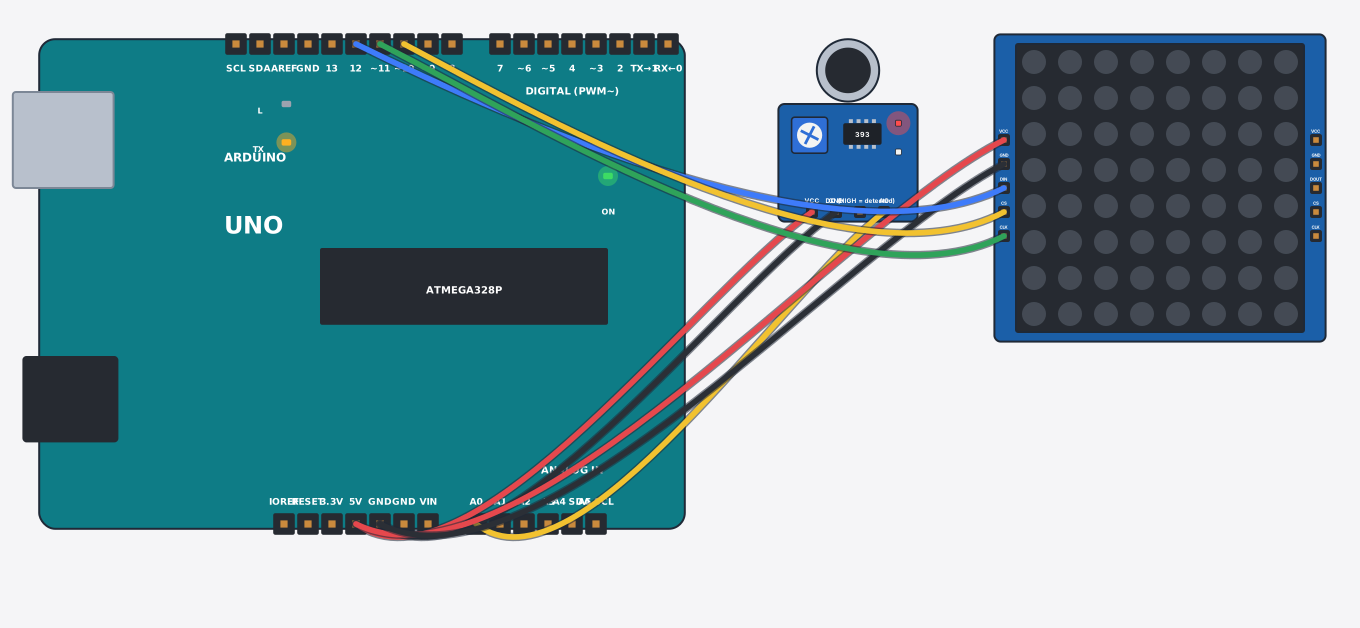
যা যা লাগবে · Parts you need
- 1 × Arduino Uno Arduino Uno
- 1 × Sound sensor (microphone) শব্দ সেন্সর (মাইক্রোফোন)
- 1 × LED matrix 8x8 (MAX7219) LED ম্যাট্রিক্স ৮x৮ (MAX7219)
- 8 × Jumper wires জাম্পার তার
তার লাগানো · Wiring
| Sound sensor (microphone) VCC | → | Arduino Uno 5V |
| Sound sensor (microphone) GND | → | Arduino Uno GND |
| Sound sensor (microphone) AO | → | Arduino Uno A0 |
| LED matrix 8x8 (MAX7219) VCC | → | Arduino Uno 5V |
| LED matrix 8x8 (MAX7219) GND | → | Arduino Uno GND |
| LED matrix 8x8 (MAX7219) DIN | → | Arduino Uno D12 |
| LED matrix 8x8 (MAX7219) CLK | → | Arduino Uno D11 |
| LED matrix 8x8 (MAX7219) CS | → | Arduino Uno D10 |
Code (Arduino C++)
#include <LedControl.h>
// Music visualizer: the microphone's level decides how many of the 8 columns in
// the bottom row of the dot-matrix light up. LedControl drives the whole matrix
// with 3 pins; setRow() writes one row of 8 pixels at a time. Play music (slide
// the Loudness control) and watch the bar dance.
LedControl mx = LedControl(12, 11, 10, 1);
const int mic = A0;

void setup() {
  mx.shutdown(0, false);
  mx.setIntensity(0, 8);
  mx.clearDisplay(0);
  Serial.begin(9600);
}

void loop() {
  int pct = map(analogRead(mic), 100, 970, 0, 100);
  pct = constrain(pct, 0, 100);
  int bars = pct * 8 / 100;                       // 0..8 lit columns
  byte pattern = bars == 0 ? 0 : (0xFF << (8 - bars)) & 0xFF;
  mx.setRow(0, 0, pattern);
  Serial.print("bars="); Serial.println(bars);
  delay(120);
}
আরো project · More projects
- পানি ছাড়া ট্যাংকের লেভেল (ultrasonic + অটো ফিল)Contactless water tank level (ultrasonic + auto refill)
- ঘনত্ব অনুযায়ী ট্রাফিক সিগন্যাল (কার অনুযায়ী সবুজ)Density-based traffic signal (green time follows the queue)
- GPS জিওফেন্স এলার্ম (পোষা প্রাণী বা সাইকেলের জন্য)GPS geofence alert (pet collar / bike tracker)
- স্মার্ট ডোরবেল: দুই সুরের ঘণ্টাSmart doorbell with a two-tone chime