স্মার্ট ডোরবেল: দুই সুরের ঘণ্টাSmart Doorbell with Arduino
বাটন চাপলে buzzer দুই সুরে বাজে, LED জ্বলে-নেভে, আর sketch জানায় দরজায় কেউ এসেছে। ৩ সেকেন্ডের lockout থাকায় বাটন চেপে ধরে রাখলে বারবার বাজে না — দরজার ঘণ্টা আর উত্ত্যক্তকর যন্ত্রের পার্থক্য এটাই।
Press the button and the buzzer plays ding-dong, the LED flashes for the visitor, and the sketch says who is at the door. A 3-second lockout keeps a held or hammered button from ringing non-stop — the difference between a doorbell and a nuisance.
সার্কিট ডায়াগ্রাম · Circuit diagram
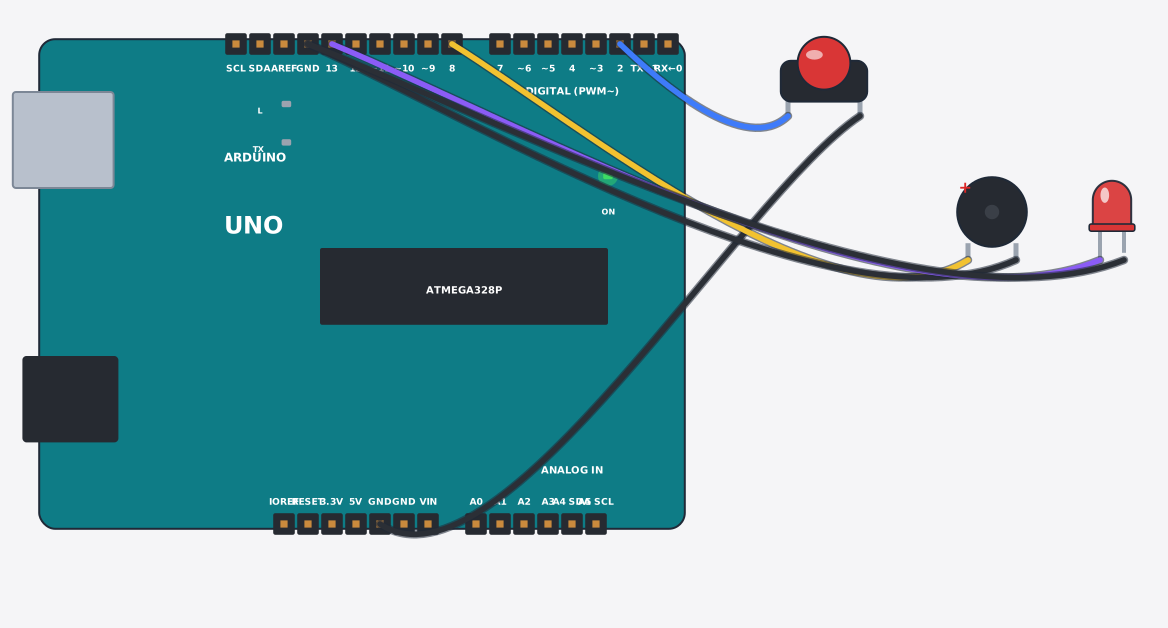
যা যা লাগবে · Parts you need
- 1 × Arduino Uno Arduino Uno
- 1 × Push button চাপ-বাটন
- 1 × Buzzer Buzzer (বাঁশি)
- 1 × LED (red) LED বাতি
- 6 × Jumper wires জাম্পার তার
তার লাগানো · Wiring
| Arduino Uno D2 | → | Push button 1 |
| Push button 2 | → | Arduino Uno GND |
| Arduino Uno D8 | → | Buzzer + |
| Buzzer - | → | Arduino Uno GND.3 |
| Arduino Uno D13 | → | LED A |
| LED K | → | Arduino Uno GND.3 |
Code (Arduino C++)
// A doorbell that knows someone is there: press the button and it plays a
// two-tone chime, flashes the LED, announces the visitor on the Serial Monitor,
// then ignores repeat presses for 3 seconds so a held button rings once.
const int button = 2, buzzer = 8, led = 13;

void setup() {
  pinMode(button, INPUT_PULLUP);
  pinMode(led, OUTPUT);
  Serial.begin(9600);
}

void loop() {
  if (digitalRead(button) == LOW) {
    Serial.println("Ding dong - someone at the door");
    tone(buzzer, 1000, 250);
    digitalWrite(led, HIGH);
    delay(300);
    tone(buzzer, 800, 350);
    delay(400);
    digitalWrite(led, LOW);
    delay(3000);
  }
  delay(50);
}