সোনার হ্যাপটিক বেল্ট — বাধা কাছে হলে কম্পন বাড়েSonic Haptic Belt
ছড়ি দিয়ে হাতে টের পাওয়া যায়, এই বেল্টে শরীরে টের পাওয়া যায় — সোনার চোখ দূরত্ব মাপে, আর বাধা কাছে হলে কোমরের কম্পন তত জোরে জাগে।
A walking cane warns by touch; this belt warns by feel on the waist. The ultrasonic eye measures the gap, and the coin vibration motor hums harder as it shrinks — the body feels distance before the feet find it.
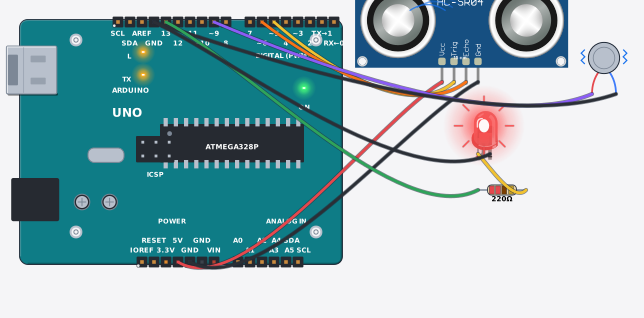
সার্কিট ডায়াগ্রাম · Circuit diagram
যা যা লাগবে · Parts you need
- 1 × Arduino Uno R3 Arduino Uno
- 1 × Ultrasonic distance sensor (HC-SR04 / JSN-SR04T) আল্ট্রাসনিক দূরত্ব সেন্সর (HC-SR04 / JSN-SR04T)
- 1 × Vibration motor (coin) ভাইব্রেশন মোটর (কয়েন)
- 1 × Resistor 220Ω Resistor
- 1 × LED (red) LED বাতি
- 9 × Jumper wires জাম্পার তার
তার লাগানো · Wiring
| Ultrasonic distance sensor (HC-SR04 / JSN-SR04T) VCC | → | Arduino Uno R3 5V |
| Ultrasonic distance sensor (HC-SR04 / JSN-SR04T) GND | → | Arduino Uno R3 GND |
| Ultrasonic distance sensor (HC-SR04 / JSN-SR04T) TRIG | → | Arduino Uno R3 D5 |
| Ultrasonic distance sensor (HC-SR04 / JSN-SR04T) ECHO | → | Arduino Uno R3 D6 |
| Vibration motor (coin) + | → | Arduino Uno R3 D9 |
| Vibration motor (coin) - | → | Arduino Uno R3 GND.3 |
| Arduino Uno R3 D13 | → | Resistor a |
| Resistor b | → | LED A |
| LED K | → | Arduino Uno R3 GND.3 |
Code (Arduino C++)
// Sonic haptic belt: a walking-cane alternative for low-vision users. The
// ultrasonic eye measures the gap ahead; a coin vibration motor on the waist
// hums harder as the gap shrinks, so the body feels distance before the feet
// find it. PWM duty (analogWrite) sets the strength — close means STRONG.
void setup() {
  Serial.begin(9600);
  pinMode(5, OUTPUT);
  pinMode(6, INPUT);
  pinMode(9, OUTPUT);
  pinMode(13, OUTPUT);
}

void loop() {
  digitalWrite(5, LOW); delayMicroseconds(2);
  digitalWrite(5, HIGH); delayMicroseconds(10);
  digitalWrite(5, LOW);
  long echo = pulseIn(6, HIGH, 30000);
  int cm = echo / 58;                                // microseconds -> centimetres
  int duty = 0;
  String level = "clear";
  if (cm > 0 && cm < 40) { duty = 220; level = "STRONG"; }
  else if (cm < 120) { duty = 130; level = "MEDIUM"; }
  analogWrite(9, duty);
  digitalWrite(13, duty == 220 ? HIGH : LOW);
  Serial.print("Distance: "); Serial.print(cm);
  Serial.print(" cm | Belt: "); Serial.println(level);
  delay(120);
}
আরো project · More projects
- কনট্যাক্টছাড়া স্যানিটাইজার — VL53L0X লেজার চোখ দিয়েContactless sanitizer dispenser (VL53L0X laser eye)
- পানির ট্যাংক অটো-ফিল — পাম্প নিজে নিজে বন্ধ হয়Water tank auto-fill (pump cuts off by itself)
- টিল্ট ট্যাম্পার অ্যালার্ম — নাড়ালেই বাজতে থাকে, রিসেট দিলে থামেTilt tamper alarm (money box screams until reset)
- 18650 ব্যাটারি হেলথ চেকার — তিনটা বাতি দিয়ে রায়18650 battery health checker (traffic-light verdict)