সাইকেল স্পিডোমিটারHall Effect Speed Sensor Arduino + TM1637
চাকার স্পোকে বাঁধা চুম্বক প্রতি ঘোরায় একবার KY-003 hall sensor এর পাশ দিয়ে যায়, আর তার DO এক মুহূর্তের জন্য LOW হয়। Sketch টা এক সেকেন্ডের জানালায় pulse গুনে চাকার সার্কামফারেন্স দিয়ে গুণ করে km/h বের করে (ঘোরা × মিটার × 3.6), TM1637 ডিসপ্লেতে দেখায়, আর প্রতি পাসে buzzer এ ছোট্ট একটা বিপ বাজে — সাইকেলের কম্পিউটারও একই হিসাব চালায়।
A magnet on a spoke passes the KY-003 once per revolution, pulling its DO LOW for an instant. The sketch counts those pulses over one second, multiplies by the wheel circumference (metres per turn × pulses × 3.6 = km/h) and shows it on a 4-digit TM1637, with a tick on the buzzer for every pass — the same maths a cyclocomputer runs.
সার্কিট ডায়াগ্রাম · Circuit diagram
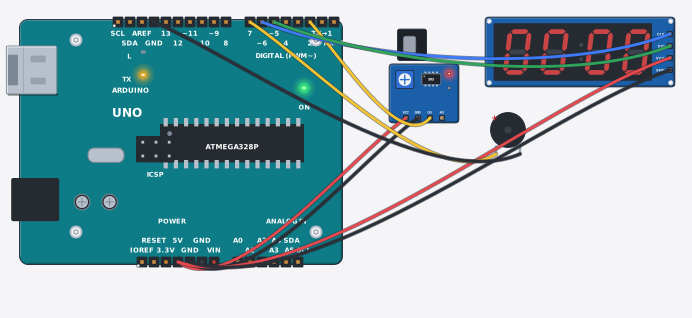
যা যা লাগবে · Parts you need
- 1 × Arduino Uno R3 Arduino Uno
- 1 × Hall effect sensor (KY-003) হল ইফেক্ট সেন্সর (KY-003)
- 1 × 4-digit display (TM1637) ৪ ঘরের ডিসপ্লে (TM1637)
- 1 × Buzzer (5 V) Buzzer (বাঁশি, 5 V)
- 9 × Jumper wires জাম্পার তার
তার লাগানো · Wiring
| Hall effect sensor (KY-003) VCC | → | Arduino Uno R3 5V |
| Hall effect sensor (KY-003) GND | → | Arduino Uno R3 GND |
| Hall effect sensor (KY-003) DO | → | Arduino Uno R3 D2 |
| 4-digit display (TM1637) VCC | → | Arduino Uno R3 5V |
| 4-digit display (TM1637) GND | → | Arduino Uno R3 GND |
| 4-digit display (TM1637) CLK | → | Arduino Uno R3 D6 |
| 4-digit display (TM1637) DIO | → | Arduino Uno R3 D5 |
| Buzzer (5 V) + | → | Arduino Uno R3 D7 |
| Buzzer (5 V) - | → | Arduino Uno R3 GND.3 |
Code (Arduino C++)
// Bicycle speedometer: a magnet taped to a spoke passes the KY-003 hall sensor
// once every wheel turn, and its DO pin drops LOW for that instant. The sketch
// counts those pulses over a 1-second window, multiplies by the wheel's
// circumference and shows km/h on the TM1637 display - the same maths a
// cyclocomputer runs. Set WHEEL_M to your wheel (26" MTB ~2.1 m, 700c ~2.2 m).
#include <TM1637Display.h>
const int hallPin = 2, beeper = 7;
TM1637Display disp(6, 5);                      // CLK, DIO
const float WHEEL_M = 2.1;                     // metres per wheel revolution
unsigned int pulses = 0;
unsigned long window = 0;
bool wasNear = false;

void setup() {
  Serial.begin(9600);
  pinMode(hallPin, INPUT_PULLUP);               // DO: HIGH at rest, LOW while the south pole is near
  disp.setBrightness(3);
  disp.showNumberDec(0, true);
}

void loop() {
  if (millis() - window >= 1000) {              // the 1-second window closes on what it collected
    float kmh = pulses * WHEEL_M * 3.6;         // rev/s x m/rev = m/s; x3.6 = km/h
    disp.showNumberDec((int)(kmh + 0.5), true);
    Serial.print("Speed: "); Serial.print(kmh); Serial.println(" km/h");
    pulses = 0;
    window = millis();
  }
  bool near = digitalRead(hallPin) == LOW;
  if (near && !wasNear) { pulses++; tone(beeper, 2400, 40); }   // one tick per pass
  wasNear = near;
  delay(20);
}
আরো project · More projects
- তাপমাত্রা অনুযায়ী ফ্যানAuto fan speed by temperature
- ক্লাসের ফ্যান: CO₂ আর নড়াচড়া দিয়ে চেষ্টাClassroom fan: test a CO₂ + motion idea
- স্মার্ট সেচ ব্যবস্থা (ক্যালিব্রেটেড, LCD সহ)Smart irrigation system (calibrated, with LCD)
- অগ্নিনির্বাপক রোবট (আগুন খুঁজে পানি ছাটে)Fire-fighting robot (finds the flame, pumps water)