তাপমাত্রা অনুযায়ী ফ্যানArduino Automatic Fan Speed by Temperature
NTC থার্মিস্টর একটা 10 k resistor এর সাথে divider এ বসে; beta equation analogRead কে আবার °C এ ফেরত নেয়। ফ্যানের duty চার ধাপের ম্যাপ মেনে চলে — বন্ধ, ধীরে, মাঝারি, পুরো — লাইন পার হলে সাথে সাথে বাড়ে, কিন্তু কমে তখনই যখন তাপমাত্রা সেই লাইনের ২ ডিগ্রি নিচে নামে। এই hysteresis band ই গভর্নর আর বিকেলভর ক্লিক করা ফ্যানের তফাত; LCD তে তাপমাত্রা আর duty লাইভ দেখা যায়।
The NTC sits in a divider with a 10 k resistor; the beta equation turns analogRead back into °C. The fan duty follows a 4-step map — off, gentle, medium, full — stepping up the moment a line is crossed, but stepping down only after the temperature falls 2 degrees further below that line. That hysteresis band is the difference between a governor and a fan that clicks on and off all afternoon; the LCD shows the temperature and duty live.
সার্কিট ডায়াগ্রাম · Circuit diagram
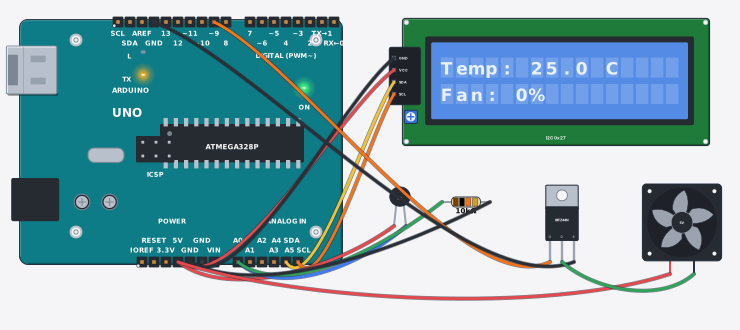
যা যা লাগবে · Parts you need
- 1 × Arduino Uno R3 Arduino Uno
- 1 × LCD 16x2 with I2C LCD ১৬x২ (I2C)
- 1 × NTC thermistor (10 kΩ) NTC থার্মিস্টর (10 kΩ)
- 1 × Resistor 10000Ω Resistor
- 1 × MOSFET (IRFZ44N) MOSFET (IRFZ44N)
- 1 × Cooling fan (12 V) কুলিং ফ্যান (12 V)
- 12 × Jumper wires জাম্পার তার
তার লাগানো · Wiring
| LCD 16x2 with I2C VCC | → | Arduino Uno R3 5V |
| LCD 16x2 with I2C GND | → | Arduino Uno R3 GND |
| LCD 16x2 with I2C SDA | → | Arduino Uno R3 A4 |
| LCD 16x2 with I2C SCL | → | Arduino Uno R3 A5 |
| Arduino Uno R3 5V | → | NTC thermistor (10 kΩ) 1 |
| NTC thermistor (10 kΩ) 2 | → | Arduino Uno R3 A0 |
| Arduino Uno R3 A0 | → | Resistor a |
| Resistor b | → | Arduino Uno R3 GND |
| Arduino Uno R3 D9 | → | MOSFET (IRFZ44N) G |
| MOSFET (IRFZ44N) S | → | Arduino Uno R3 GND.3 |
| Cooling fan (12 V) + | → | Arduino Uno R3 5V |
| Cooling fan (12 V) - | → | MOSFET (IRFZ44N) D |
Code (Arduino C++)
#include <Wire.h>
#include <LiquidCrystal_I2C.h>
LiquidCrystal_I2C lcd(0x27, 16, 2);
// Auto fan governor: a 10 k NTC in a divider with a 10 k resistor reports the
// heat, and the fan (switched low-side by the MOSFET) follows a 4-step map -
// off, gentle, medium, full. The steps UP happen the moment the temperature
// crosses a line; the steps DOWN wait until it has cooled 2 degrees further
// below that same line. That hysteresis band is what stops a fan hovering at
// a borderline temperature from chattering on and off all afternoon.
const int probe = A0, gate = 9;
int level = 0;

float readTempC() {
  float raw = analogRead(probe);
  if (raw < 1) raw = 1;                                // keep log() finite
  float ntc = 10000.0 * (1023.0 - raw) / raw;          // divider maths back to ohms
  float kelvin = 1.0 / (1.0 / 298.15 + log(ntc / 10000.0) / 3950.0);
  return kelvin - 273.15;                              // the beta equation, inverted
}

void setup() {
  Serial.begin(9600);
  pinMode(gate, OUTPUT);
  lcd.init();
  lcd.backlight();
}

void loop() {
  float t = readTempC();
  if (t > 27 && level < 1) level = 1;                  // step up instantly...
  if (t > 30 && level < 2) level = 2;
  if (t > 33 && level < 3) level = 3;
  if (level == 3 && t < 31) level = 2;                 // ...but step down 2 degrees colder
  if (level == 2 && t < 28) level = 1;
  if (level == 1 && t < 25) level = 0;
  int duty = level == 0 ? 0 : (level == 1 ? 90 : (level == 2 ? 170 : 255));
  int pct = (int)(duty * 100.0 / 255.0 + 0.5);
  analogWrite(gate, duty);                             // PWM on the MOSFET gate
  lcd.setCursor(0, 0); lcd.print("Temp: "); lcd.print(t, 1); lcd.print(" C   ");
  lcd.setCursor(0, 1); lcd.print("Fan: "); lcd.print(pct); lcd.print("%   ");
  Serial.print("Temp "); Serial.print(t, 1); Serial.print(" C | Fan: "); Serial.print(pct); Serial.println("%");
  delay(300);
}
আরো project · More projects
- ক্লাসের ফ্যান: CO₂ আর নড়াচড়া দিয়ে চেষ্টাClassroom fan: test a CO₂ + motion idea
- স্মার্ট সেচ ব্যবস্থা (ক্যালিব্রেটেড, LCD সহ)Smart irrigation system (calibrated, with LCD)
- অগ্নিনির্বাপক রোবট (আগুন খুঁজে পানি ছাটে)Fire-fighting robot (finds the flame, pumps water)
- ব্লুটুথ গাড়ি (HC-05 + L298N)Bluetooth-controlled car (HC-05 + L298N)