ব্লুটুথ গাড়ি (HC-05 + L298N)Bluetooth Controlled Car using Arduino (HC-05 + L298N)
ফোন HC-05 এর সাথে pair হয়ে serial এ একটা করে অক্ষর পাঠায়। Arduino F, B, L, R, S বুঝে L298N এর pin দিয়ে দুই চাকা ঘোরায়। ফোনের serial Bluetooth terminal app ই রিমোট — আলাদা কিছু লাগে না।
The phone pairs with the HC-05 and sends single letters over its serial link. The Arduino maps F, B, L, R and S to the L298N inputs that drive the two wheels. A serial Bluetooth terminal app is the controller — no special app needed.
সার্কিট ডায়াগ্রাম · Circuit diagram
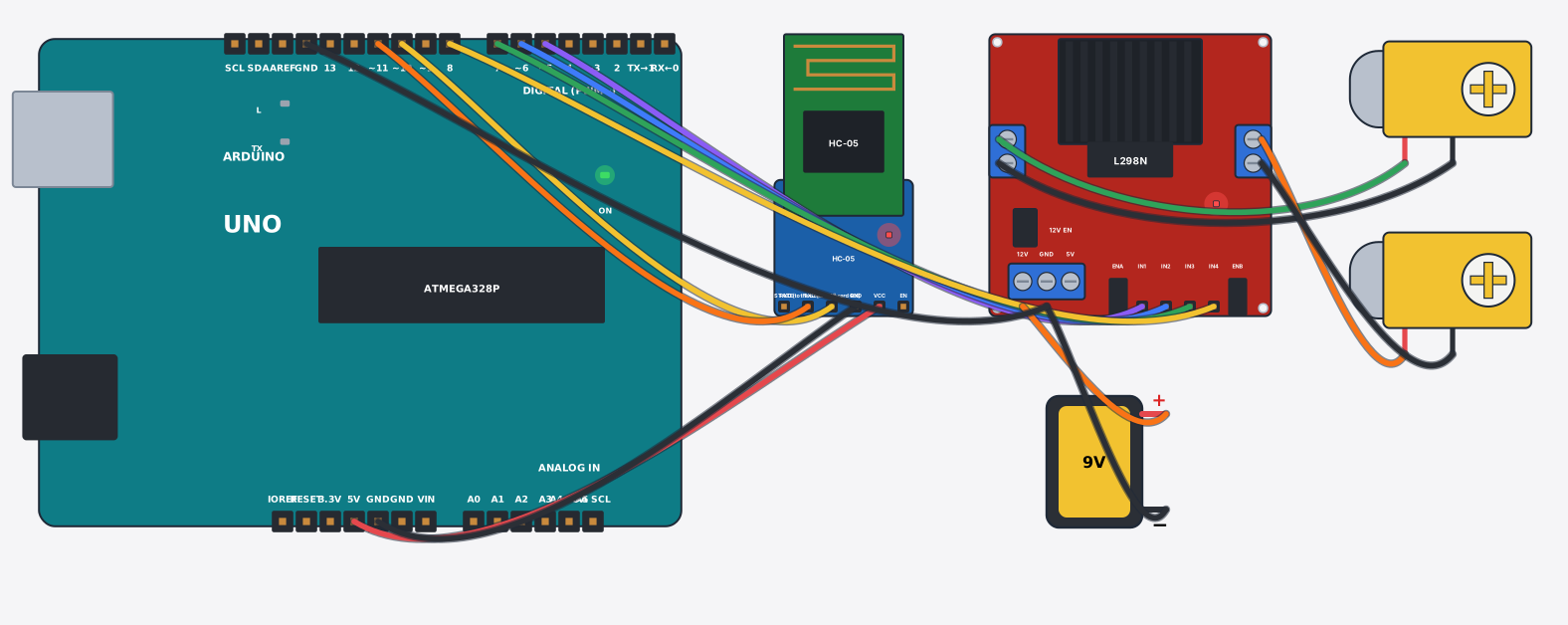
যা যা লাগবে · Parts you need
- 1 × Arduino Uno Arduino Uno
- 1 × Bluetooth module (HC-05) ব্লুটুথ মডিউল (HC-05)
- 1 × Motor driver L298N মোটর ড্রাইভার L298N
- 2 × Gear motor (yellow TT) গিয়ার মোটর (হলুদ TT)
- 1 × 9 V battery ৯ V ব্যাটারি
- 15 × Jumper wires জাম্পার তার
সব part একসাথে · All parts in one box: 4wd robot car chassis kit
তার লাগানো · Wiring
| Bluetooth module (HC-05) VCC | → | Arduino Uno 5V |
| Bluetooth module (HC-05) GND | → | Arduino Uno GND |
| Bluetooth module (HC-05) TXD | → | Arduino Uno D10 |
| Bluetooth module (HC-05) RXD | → | Arduino Uno D11 |
| Motor driver L298N IN1 | → | Arduino Uno D5 |
| Motor driver L298N IN2 | → | Arduino Uno D6 |
| Motor driver L298N IN3 | → | Arduino Uno D7 |
| Motor driver L298N IN4 | → | Arduino Uno D8 |
| 9 V battery + | → | Motor driver L298N 12V |
| Motor driver L298N GND | → | 9 V battery - |
| Motor driver L298N GND | → | Arduino Uno GND.3 |
| Motor driver L298N OUT1 | → | Gear motor (yellow TT) + |
| Motor driver L298N OUT2 | → | Gear motor (yellow TT) - |
| Motor driver L298N OUT3 | → | Gear motor (yellow TT) + |
| Motor driver L298N OUT4 | → | Gear motor (yellow TT) - |
Code (Arduino C++)
#include <SoftwareSerial.h>
// Bluetooth-controlled car: pair your phone with the HC-05 (pin 1234), open a
// serial Bluetooth terminal app and send F / B / L / R / S.
SoftwareSerial bt(10, 11);   // RX, TX
const int IN1 = 5, IN2 = 6, IN3 = 7, IN4 = 8;

void drive(int a1, int a2, int b1, int b2) {
  digitalWrite(IN1, a1); digitalWrite(IN2, a2);
  digitalWrite(IN3, b1); digitalWrite(IN4, b2);
}

void setup() {
  pinMode(IN1, OUTPUT); pinMode(IN2, OUTPUT); pinMode(IN3, OUTPUT); pinMode(IN4, OUTPUT);
  bt.begin(9600);
  bt.println("Send F B L R S");
  Serial.begin(9600);
}

void loop() {
  if (!bt.available()) return;
  char c = bt.read();
  switch (c) {
    case 'F': drive(HIGH, LOW, HIGH, LOW); bt.println("Forward"); Serial.println("Forward"); break;
    case 'B': drive(LOW, HIGH, LOW, HIGH); bt.println("Back");    Serial.println("Back");    break;
    case 'L': drive(LOW, HIGH, HIGH, LOW); bt.println("Left");    Serial.println("Left");    break;
    case 'R': drive(HIGH, LOW, LOW, HIGH); bt.println("Right");   Serial.println("Right");   break;
    case 'S': drive(LOW, LOW, LOW, LOW);   bt.println("Stop");    Serial.println("Stop");    break;
  }
}
আরো project · More projects
- বৃষ্টির এলার্ম (বৃষ্টি ধরার যন্ত্র)Rain alarm (rain detector with buzzer)
- ৫৫৫ টাইমার astable — code ছাড়াই LED জ্বলা-নেভা555 timer astable — an LED blinker with no code
- ৭৪HC595 শিফট রেজিস্টার দিয়ে LED চেজার (৮টা LED, ৩ pin)LED chaser with a 74HC595 shift register (8 LEDs, 3 pins)
- হার্টবিট মনিটর (MAX30102 + OLED)Heartbeat monitor (MAX30102 + OLED)