এনার্জি মনিটর: LCD তে V, I ও power (ACS712)Energy monitor: real V, I and power on an LCD (ACS712)
সার্কিট ডায়াগ্রাম · Circuit diagram
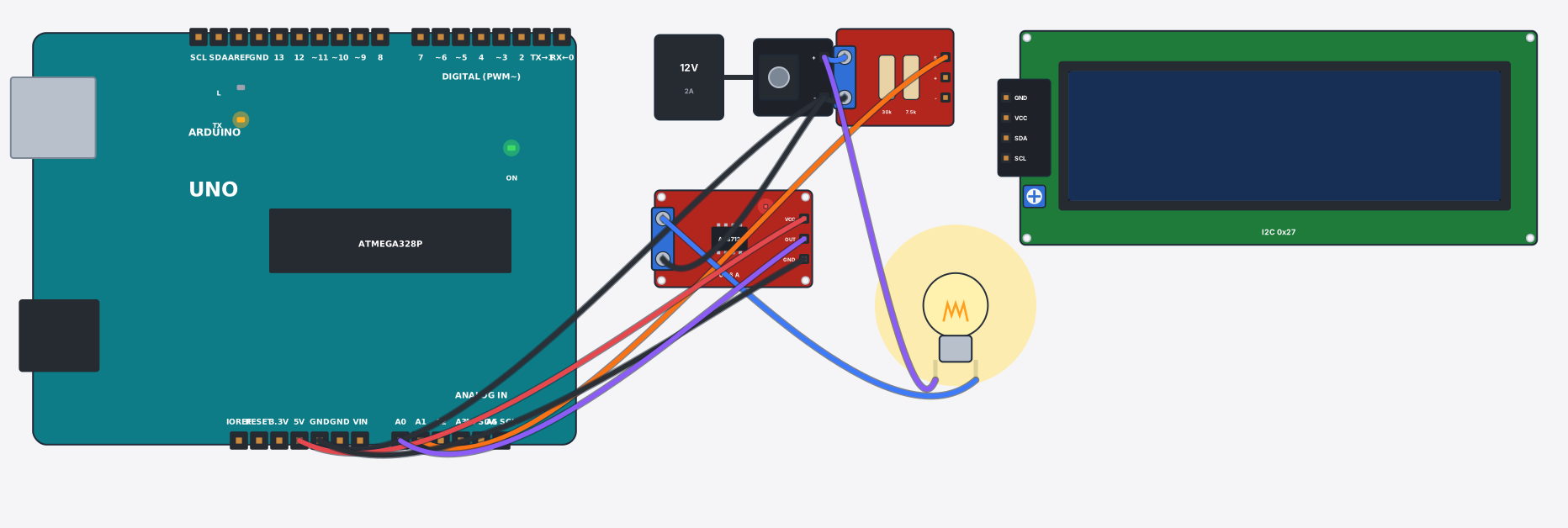
যা যা লাগবে · Parts you need
- 1 × Arduino Uno Arduino Uno
- 1 × DC adapter + jack (12 V) DC adapter + জ্যাক (12 V)
- 1 × Voltage sensor (0–25 V) ভোল্টেজ সেন্সর (0–25 V)
- 1 × LCD 16x2 with I2C LCD ১৬x২ (I2C)
- 1 × Current sensor (ACS712) কারেন্ট সেন্সর (ACS712)
- 1 × Light bulb বাল্ব
- 10 × Jumper wires জাম্পার তার
তার লাগানো · Wiring
| DC adapter + jack (12 V) + | → | Voltage sensor (0–25 V) VCC |
| DC adapter + jack (12 V) - | → | Voltage sensor (0–25 V) GND |
| DC adapter + jack (12 V) - | → | Arduino Uno GND |
| Voltage sensor (0–25 V) S | → | Arduino Uno A1 |
| DC adapter + jack (12 V) + | → | Light bulb a |
| Light bulb b | → | Current sensor (ACS712) IP+ |
| Current sensor (ACS712) IP- | → | DC adapter + jack (12 V) - |
| Current sensor (ACS712) VCC | → | Arduino Uno 5V |
| Current sensor (ACS712) GND | → | Arduino Uno GND |
| Current sensor (ACS712) OUT | → | Arduino Uno A0 |
Code (Arduino C++)
#include <Wire.h>
#include <LiquidCrystal_I2C.h>
// Energy monitor: the voltage sensor divides the supply by 5 (A1), and the ACS712
// sits IN SERIES with the lamp — its output is 2.5 V at zero current and moves
// 185 mV per amp (the 5 A model). Power = V x I. Change the adapter voltage and
// watch all three numbers move.
LiquidCrystal_I2C lcd(0x27, 16, 2);
const float ACS_SENS = 0.185;    // V per A for the 5 A model (20 A = 0.100, 30 A = 0.066)

void setup() {
  lcd.init();
  lcd.backlight();
  Serial.begin(9600);
}

void loop() {
  float volts = analogRead(A1) * (5.0 / 1023.0) * 5.0;             // sensor divides by 5
  float amps  = (analogRead(A0) * (5.0 / 1023.0) - 2.5) / ACS_SENS;
  if (amps < 0) amps = -amps;                                      // DC: direction does not matter
  float watts = volts * amps;
  lcd.setCursor(0, 0);
  lcd.print(volts, 1); lcd.print("V  "); lcd.print(amps, 2); lcd.print("A ");
  lcd.setCursor(0, 1);
  lcd.print(watts, 1); lcd.print(" W          ");
  Serial.print("V="); Serial.print(volts, 1);
  Serial.print(" I="); Serial.print(amps, 3);
  Serial.print(" P="); Serial.print(watts, 2); Serial.println(" W");
  delay(500);
}
আরো project · More projects
- স্টেপার মোটর 28BYJ-48: ULN2003 দিয়ে নিখুঁত ঘোরাStepper motor 28BYJ-48: exact turns with the ULN2003
- এয়ার কোয়ালিটি মনিটর (MQ-135): LCD তে বাতাসের মানAir quality monitor (MQ-135): fresh or polluted on an LCD
- সোলার ট্র্যাকার: প্যানেল রোদের দিকে ঘোরেSolar tracker: the panel follows the sun
- দুমুখো ভিজিটর কাউন্টার (LCD তে ঢোকা-বের হওয়া)Bidirectional visitor counter (in/out on LCD)