হোম অটোমেশন: ব্লুটুথে ৪টা বাতি (রিলে মডিউল)Home Automation using Arduino: 4 Lamps over Bluetooth & Relays
ফোন থেকে Bluetooth এ ১, ২, ৩ বা ৪ পাঠালে Arduino সেই রিলে টগল করে। এই রিলে বোর্ডগুলো active LOW — LOW দিলে চালু হয় — প্রথমবার সবাই এটাতেই আটকায়।
The phone sends 1, 2, 3 or 4 over Bluetooth; the Arduino toggles that relay. These relay boards are active LOW — a LOW output closes the contact — which is the one thing that surprises everyone the first time.
সার্কিট ডায়াগ্রাম · Circuit diagram
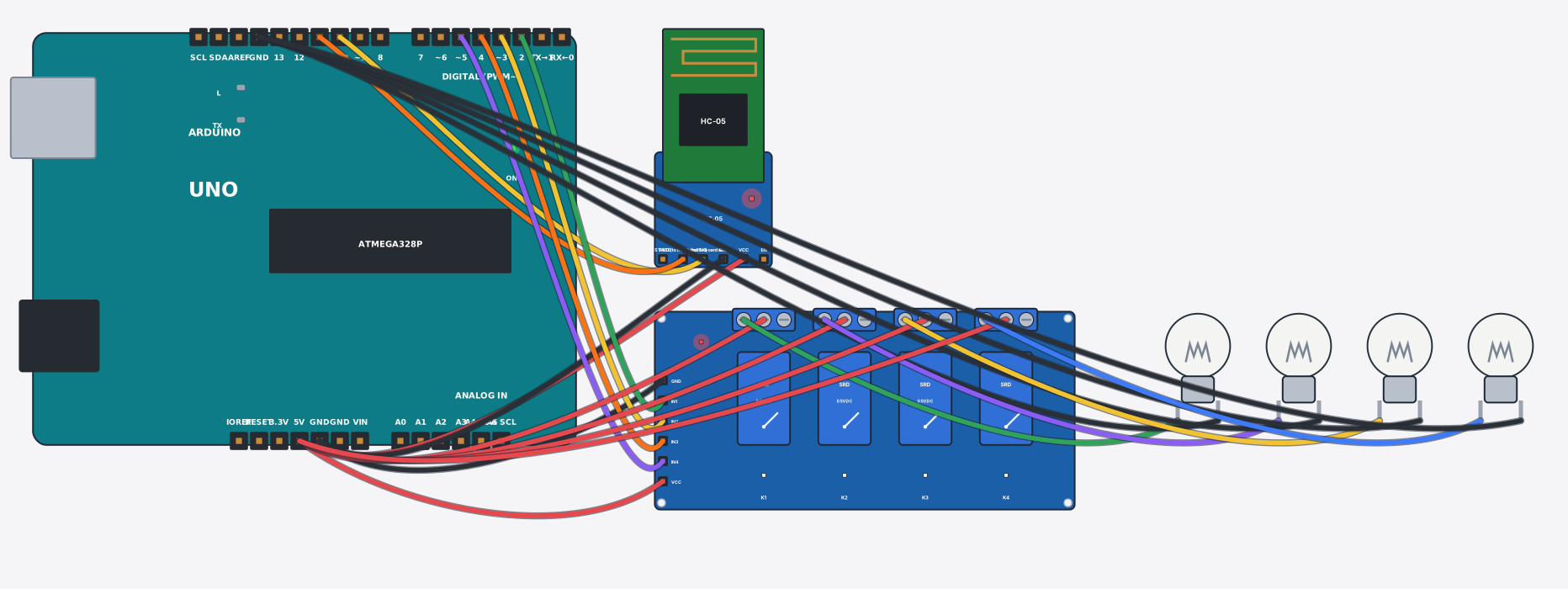
যা যা লাগবে · Parts you need
- 1 × Arduino Uno Arduino Uno
- 1 × Bluetooth module (HC-05) ব্লুটুথ মডিউল (HC-05)
- 1 × Relay module (4 channel) রিলে মডিউল (৪ চ্যানেল)
- 4 × Light bulb বাল্ব
- 22 × Jumper wires জাম্পার তার
তার লাগানো · Wiring
| Bluetooth module (HC-05) VCC | → | Arduino Uno 5V |
| Bluetooth module (HC-05) GND | → | Arduino Uno GND |
| Bluetooth module (HC-05) TXD | → | Arduino Uno D10 |
| Bluetooth module (HC-05) RXD | → | Arduino Uno D11 |
| Relay module (4 channel) VCC | → | Arduino Uno 5V |
| Relay module (4 channel) GND | → | Arduino Uno GND |
| Relay module (4 channel) IN1 | → | Arduino Uno D2 |
| Relay module (4 channel) IN2 | → | Arduino Uno D3 |
| Relay module (4 channel) IN3 | → | Arduino Uno D4 |
| Relay module (4 channel) IN4 | → | Arduino Uno D5 |
| Relay module (4 channel) COM1 | → | Arduino Uno 5V |
| Relay module (4 channel) NO1 | → | Light bulb a |
| Light bulb b | → | Arduino Uno GND.3 |
| Relay module (4 channel) COM2 | → | Arduino Uno 5V |
| Relay module (4 channel) NO2 | → | Light bulb a |
| Light bulb b | → | Arduino Uno GND.3 |
| Relay module (4 channel) COM3 | → | Arduino Uno 5V |
| Relay module (4 channel) NO3 | → | Light bulb a |
| Light bulb b | → | Arduino Uno GND.3 |
| Relay module (4 channel) COM4 | → | Arduino Uno 5V |
| Relay module (4 channel) NO4 | → | Light bulb a |
| Light bulb b | → | Arduino Uno GND.3 |
Code (Arduino C++)
#include <SoftwareSerial.h>
// Home automation: a 4-channel relay board switches four lamps.
// These relay boards are ACTIVE LOW: digitalWrite(pin, LOW) turns the relay ON.
// From your phone (Bluetooth terminal, paired with HC-05) send 1 2 3 4 to toggle a lamp.
SoftwareSerial bt(10, 11);
const int lamp[4] = {2, 3, 4, 5};
bool on[4] = {false, false, false, false};

void setup() {
  for (int i = 0; i < 4; i++) { pinMode(lamp[i], OUTPUT); digitalWrite(lamp[i], HIGH); }
  bt.begin(9600);
  bt.println("Send 1 2 3 4 to toggle lamps");
  Serial.begin(9600);
}

void loop() {
  if (!bt.available()) return;
  char c = bt.read();
  if (c >= '1' && c <= '4') {
    int i = c - '1';
    on[i] = !on[i];
    digitalWrite(lamp[i], on[i] ? LOW : HIGH);   // LOW = relay closed = lamp on
    bt.print("Lamp "); bt.print(i + 1); bt.println(on[i] ? " ON" : " OFF");
    Serial.print("Lamp "); Serial.print(i + 1); Serial.println(on[i] ? " ON" : " OFF");
  }
}
আরো project · More projects
- IR রিমোট কন্ট্রোল (VS1838B রিসিভার)IR remote control (VS1838B receiver)
- GPS ট্র্যাকার: NEO-6M + SIM800L দিয়ে SMS এ লোকেশনGPS tracker: NEO-6M + SIM800L sends coordinates by SMS
- DS3231 RTC ঘড়ি (বিদ্যুৎ না থাকলেও সময় মনে রাখে)Digital clock with a DS3231 RTC (keeps time without power)
- ৪x৪ কিপ্যাড দিয়ে ক্যালকুলেটর (LCD তে ফলাফল)Calculator on a 4x4 keypad (LCD shows the result)