IR রিমোট কন্ট্রোল (VS1838B রিসিভার)IR Remote Arduino (VS1838B)
রিসিভার রিমোটের infrared ফ্ল্যাশ ধরে, IRremote library প্রতিটা বাটনকে একটা সংখ্যা বানায়। বাটন ১ এ একটা LED, ২ এ আরেকটা টগল হয়, ৩ এ buzzer বাজে — receiver part এর বাটনে চাপো।
The receiver catches the remote's infrared flashes and IrReceiver.decodedIRData.command gives a number per button. The sketch toggles an LED on button 1, another on 2 and beeps on 3 — press the buttons on the receiver part.
সার্কিট ডায়াগ্রাম · Circuit diagram
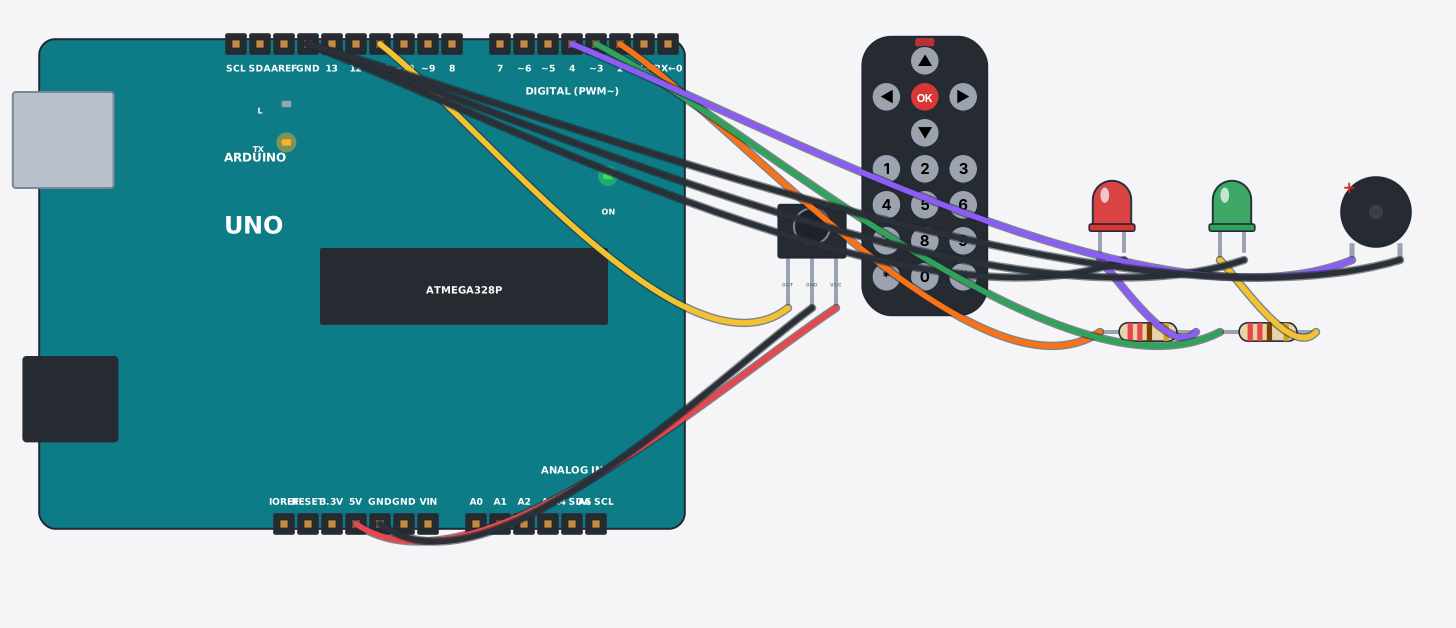
যা যা লাগবে · Parts you need
- 1 × Arduino Uno Arduino Uno
- 1 × IR receiver + remote (VS1838B) IR রিসিভার + রিমোট (VS1838B)
- 2 × Resistor 220Ω Resistor
- 1 × LED (red) LED বাতি
- 1 × LED (green) LED বাতি
- 1 × Buzzer Buzzer (বাঁশি)
- 11 × Jumper wires জাম্পার তার
তার লাগানো · Wiring
| IR receiver + remote (VS1838B) VCC | → | Arduino Uno 5V |
| IR receiver + remote (VS1838B) GND | → | Arduino Uno GND |
| IR receiver + remote (VS1838B) OUT | → | Arduino Uno D11 |
| Arduino Uno D2 | → | Resistor a |
| Resistor b | → | LED A |
| LED K | → | Arduino Uno GND.3 |
| Arduino Uno D3 | → | Resistor a |
| Resistor b | → | LED A |
| LED K | → | Arduino Uno GND.3 |
| Arduino Uno D4 | → | Buzzer + |
| Buzzer - | → | Arduino Uno GND.3 |
Code (Arduino C++)
#include <IRremote.hpp>
// IR remote control: the VS1838B catches the remote's infrared flashes and the
// IRremote library turns each button into a number (its "command").
// Tap a button on the remote part: 1 = red LED, 2 = green LED, 3 = buzzer.
const int redLed = 2, greenLed = 3, buzzer = 4;

void setup() {
  pinMode(redLed, OUTPUT);
  pinMode(greenLed, OUTPUT);
  pinMode(buzzer, OUTPUT);
  Serial.begin(9600);
  IrReceiver.begin(11, ENABLE_LED_FEEDBACK);
  Serial.println("Ready - press 1, 2 or 3 on the remote");
}

void loop() {
  if (IrReceiver.decode()) {
    unsigned int cmd = IrReceiver.decodedIRData.command;
    Serial.print("Button code: 0x"); Serial.println(cmd, HEX);
    if (cmd == 0x16) digitalWrite(redLed, !digitalRead(redLed));     // button 1
    if (cmd == 0x17) digitalWrite(greenLed, !digitalRead(greenLed)); // button 2
    if (cmd == 0x18) tone(buzzer, 1000, 300);                        // button 3
    IrReceiver.resume();
  }
}
আরো project · More projects
- GPS ট্র্যাকার: NEO-6M + SIM800L দিয়ে SMS এ লোকেশনGPS tracker: NEO-6M + SIM800L sends coordinates by SMS
- DS3231 RTC ঘড়ি (বিদ্যুৎ না থাকলেও সময় মনে রাখে)Digital clock with a DS3231 RTC (keeps time without power)
- ৪x৪ কিপ্যাড দিয়ে ক্যালকুলেটর (LCD তে ফলাফল)Calculator on a 4x4 keypad (LCD shows the result)
- ESP32 MQTT সেন্সর নোড (তাপমাত্রা publish করে)ESP32 MQTT sensor node (publishes temperature)