DS3231 RTC ঘড়ি (বিদ্যুৎ না থাকলেও সময় মনে রাখে)Digital Clock Arduino (DS3231 RTC + LCD)
DS3231 এর নিজের coin cell আর temperature-compensated crystal আছে, তাই Arduino বন্ধ থাকলেও সময় ঠিক থাকে। millis() দিয়ে বানানো ঘড়ি প্রতিবার power দিলে রিসেট হয় — তাই আসল ঘড়িতে RTC লাগে।
The DS3231 has its own coin cell and a temperature-compensated crystal, so it keeps time with the Arduino switched off. A millis() clock drifts and resets every power cycle — that is why a real clock uses an RTC.
সার্কিট ডায়াগ্রাম · Circuit diagram
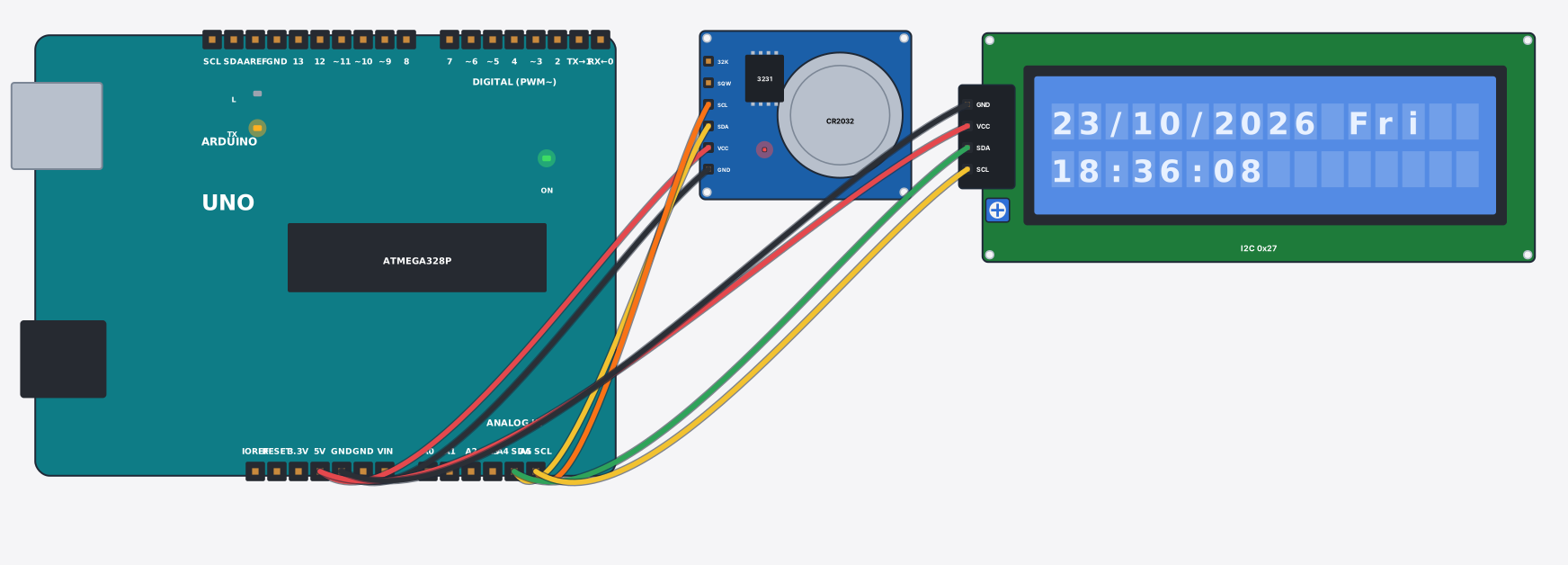
যা যা লাগবে · Parts you need
- 1 × Arduino Uno Arduino Uno
- 1 × Clock module (DS3231 RTC) ঘড়ি মডিউল (DS3231 RTC)
- 1 × LCD 16x2 with I2C LCD ১৬x২ (I2C)
- 8 × Jumper wires জাম্পার তার
তার লাগানো · Wiring
| Clock module (DS3231 RTC) VCC | → | Arduino Uno 5V |
| Clock module (DS3231 RTC) GND | → | Arduino Uno GND |
| Clock module (DS3231 RTC) SDA | → | Arduino Uno A4 |
| Clock module (DS3231 RTC) SCL | → | Arduino Uno A5 |
| LCD 16x2 with I2C VCC | → | Arduino Uno 5V |
| LCD 16x2 with I2C GND | → | Arduino Uno GND |
| LCD 16x2 with I2C SDA | → | Arduino Uno A4 |
| LCD 16x2 with I2C SCL | → | Arduino Uno A5 |
Code (Arduino C++)
#include <Wire.h>
#include <RTClib.h>
#include <LiquidCrystal_I2C.h>
// Digital clock: the DS3231 has its own coin cell and a temperature-compensated
// crystal, so it keeps time even when the Arduino is off — a plain millis() clock
// resets every time. RTClib reads it over I2C.
RTC_DS3231 rtc;
LiquidCrystal_I2C lcd(0x27, 16, 2);
char days[7][12] = {"Sun", "Mon", "Tue", "Wed", "Thu", "Fri", "Sat"};

void setup() {
  Serial.begin(9600);
  if (!rtc.begin()) { Serial.println("DS3231 not found"); while (1) delay(10); }
  lcd.init();
  lcd.backlight();
  // run this line ONCE to set the clock to when the sketch was compiled:
  // rtc.adjust(DateTime(F(__DATE__), F(__TIME__)));
}

void loop() {
  DateTime now = rtc.now();
  lcd.setCursor(0, 0);
  lcd.print(now.day()); lcd.print('/'); lcd.print(now.month()); lcd.print('/');
  lcd.print(now.year()); lcd.print(' '); lcd.print(days[now.dayOfTheWeek()]);
  lcd.setCursor(0, 1);
  if (now.hour() < 10) lcd.print('0');
  lcd.print(now.hour()); lcd.print(':');
  if (now.minute() < 10) lcd.print('0');
  lcd.print(now.minute()); lcd.print(':');
  if (now.second() < 10) lcd.print('0');
  lcd.print(now.second());
  Serial.print(now.year()); Serial.print('/'); Serial.print(now.month()); Serial.print('/');
  Serial.print(now.day()); Serial.print(' ');
  Serial.print(now.hour()); Serial.print(':'); Serial.print(now.minute()); Serial.print(':');
  Serial.println(now.second());
  delay(500);
}
আরো project · More projects
- ৪x৪ কিপ্যাড দিয়ে ক্যালকুলেটর (LCD তে ফলাফল)Calculator on a 4x4 keypad (LCD shows the result)
- ESP32 MQTT সেন্সর নোড (তাপমাত্রা publish করে)ESP32 MQTT sensor node (publishes temperature)
- দুই জয়স্টিকে চলা ৪-DOF রোবোটিক আর্ম4-DOF robotic arm controlled by two joysticks
- ওজন মাপার স্কেল: লোড সেল + HX711 (tare ও গ্রাম)Weight scale: load cell + HX711 (tare and grams)