এল২৯৮এন দিয়ে মোটরের দিক কন্ট্রোল — সামনে পিছনেMotor Direction Control with the L298N
ভোল্টেজ উল্টালে মোটর উল্টো ঘোরে — এই কাজটাই L298N করে, IN1 আর IN2 তার স্টিয়ারিং। দুটো বাটন ছেড়ে দিলে মোটর থেমে যায়।
A motor reverses when its voltage flips, and flipping voltage is the L298N job — IN1 and IN2 are the steering wheel, ENA the gate. Both buttons released coasts the motor to a stop.
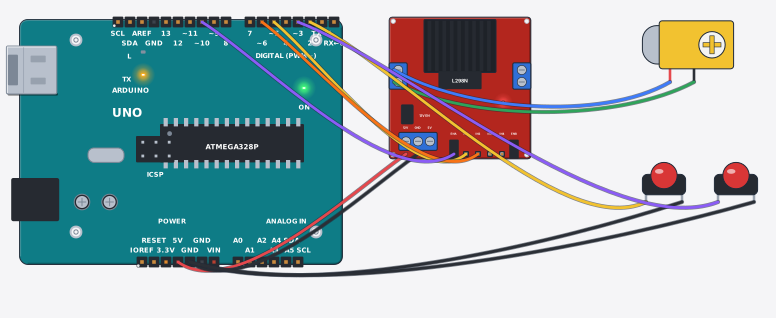
সার্কিট ডায়াগ্রাম · Circuit diagram
যা যা লাগবে · Parts you need
- 1 × Arduino Uno R3 Arduino Uno
- 1 × Motor driver L298N মোটর ড্রাইভার L298N
- 1 × Gear motor (yellow TT) গিয়ার মোটর (হলুদ TT)
- 2 × Push button চাপ-বাটন
- 11 × Jumper wires জাম্পার তার
তার লাগানো · Wiring
| Motor driver L298N 12V | → | Arduino Uno R3 5V |
| Motor driver L298N GND | → | Arduino Uno R3 GND |
| Motor driver L298N IN1 | → | Arduino Uno R3 D5 |
| Motor driver L298N IN2 | → | Arduino Uno R3 D6 |
| Motor driver L298N ENA | → | Arduino Uno R3 D10 |
| Gear motor (yellow TT) + | → | Motor driver L298N OUT1 |
| Gear motor (yellow TT) - | → | Motor driver L298N OUT2 |
| Push button 1 | → | Arduino Uno R3 D2 |
| Push button 2 | → | Arduino Uno R3 GND |
| Push button 1 | → | Arduino Uno R3 D3 |
| Push button 2 | → | Arduino Uno R3 GND |
Code (Arduino C++)
// Motor direction control: a motor spins the other way when its voltage
// flips, and flipping voltage is the L298N's whole job — two input pins per
// channel act as an H-bridge's steering wheel. Forward = IN1 high, IN2 low.
// Reverse swaps them. ENA gates the whole channel, so both buttons released
// coasts the motor to a stop. Common ground between board and driver is not
// optional — without it the signals have no reference and nothing moves.
void setup() {
  Serial.begin(9600);
  pinMode(2, INPUT_PULLUP);
  pinMode(3, INPUT_PULLUP);
  pinMode(5, OUTPUT); pinMode(6, OUTPUT); pinMode(10, OUTPUT);
}

void loop() {
  bool fwd = digitalRead(2) == LOW;
  bool rev = digitalRead(3) == LOW;
  if (fwd == rev) {                        // both or neither = coast
    digitalWrite(10, LOW);
    Serial.println("Motor: stop");
  } else if (fwd) {
    digitalWrite(10, HIGH); digitalWrite(5, HIGH); digitalWrite(6, LOW);
    Serial.println("Motor: forward");
  } else {
    digitalWrite(10, HIGH); digitalWrite(5, LOW); digitalWrite(6, HIGH);
    Serial.println("Motor: reverse");
  }
  delay(200);
}
আরো project · More projects
- এসডি কার্ডে তাপমাত্রার ডেটালগার — প্রতি সেকেন্ডে এক লাইনTemperature datalogger to an SD card (CSV, one row a second)
- গ্যাস চুলার ফ্লেম গার্ড — আগুন নিভলে গ্যাস কেটে দেয়Gas-stove flame guard (cuts the gas if the flame dies)
- সিঁড়ির বাতি নিজে নিজে বন্ধ হয় — PIR সেন্সর দিয়েStair light that switches itself off (PIR + lamp)
- ESP32 মোশন অ্যালার্ট — PIR দেখলে ক্লাউডে খবর, বাসায় বাজারESP32 motion alert (PIR pings the cloud, buzzer at home)