MOSFET দিয়ে DC মোটরের গতি নিয়ন্ত্রণ (PWM)DC Motor Speed Control using MOSFET and Arduino (PWM)
Arduino pin 12 V মোটর চালাতে পারে না, তাই pin সুইচ করে MOSFET: analogWrite gate কে pulse দেয়, pulse যত চওড়া মোটর তত দ্রুত। Gate থেকে GND তে ১০ k resistor — সবাই এটাই ভুলে যায়; এটা না থাকলে gate ভাসমান থাকে আর মোটর আর বন্ধ হয় না। দুই ground জোড়া না থাকলে কিছুই চলে না।
An Arduino pin cannot supply a 12 V motor, so the pin switches a MOSFET instead: analogWrite pulses the gate, and wider pulses mean a faster motor. The 10 k gate-to-GND resistor is the part everyone forgets — without it the gate floats and the motor never stops. Both grounds join, or nothing works.
সার্কিট ডায়াগ্রাম · Circuit diagram
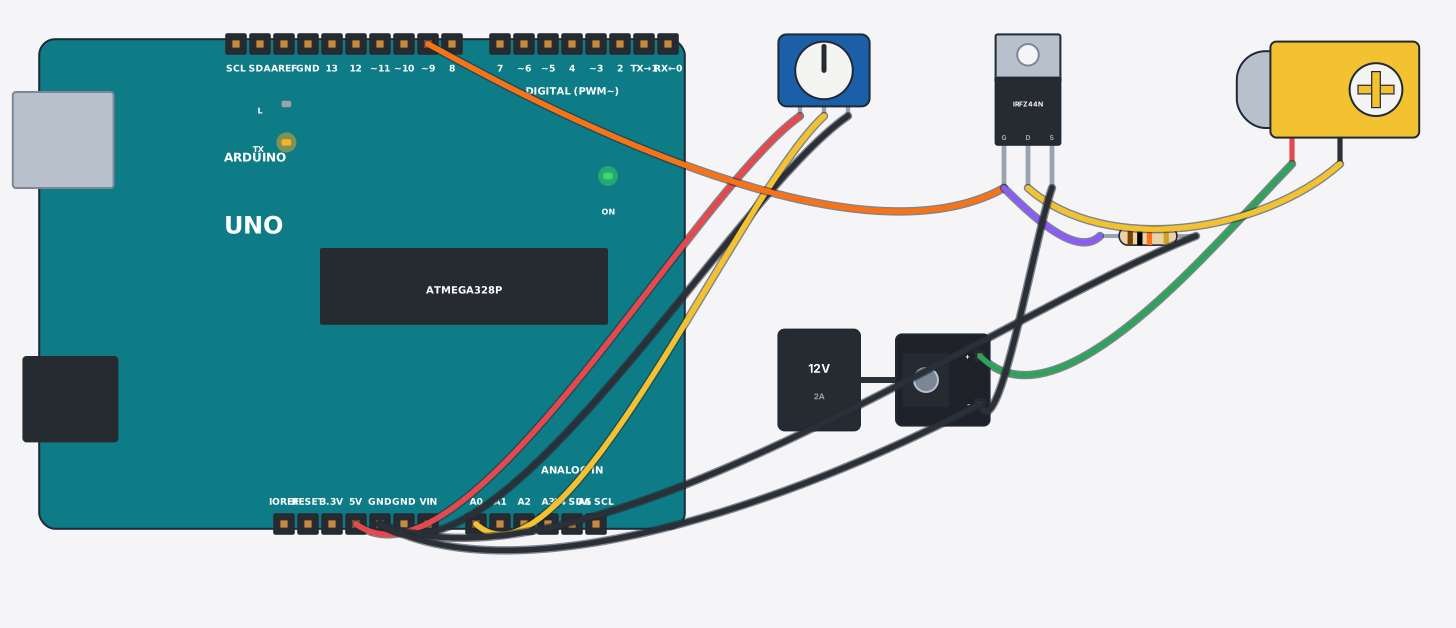
যা যা লাগবে · Parts you need
- 1 × Arduino Uno Arduino Uno
- 1 × Knob (potentiometer) নব (Potentiometer)
- 1 × MOSFET (IRFZ44N) MOSFET (IRFZ44N)
- 1 × Resistor 10000Ω Resistor
- 1 × Gear motor (yellow TT) গিয়ার মোটর (হলুদ TT)
- 1 × DC adapter + jack (12 V) DC adapter + জ্যাক (12 V)
- 10 × Jumper wires জাম্পার তার
তার লাগানো · Wiring
| Knob (potentiometer) 1 | → | Arduino Uno 5V |
| Knob (potentiometer) 2 | → | Arduino Uno GND |
| Knob (potentiometer) W | → | Arduino Uno A0 |
| Arduino Uno D9 | → | MOSFET (IRFZ44N) G |
| MOSFET (IRFZ44N) G | → | Resistor a |
| Resistor b | → | Arduino Uno GND |
| DC adapter + jack (12 V) + | → | Gear motor (yellow TT) + |
| Gear motor (yellow TT) - | → | MOSFET (IRFZ44N) D |
| MOSFET (IRFZ44N) S | → | DC adapter + jack (12 V) - |
| DC adapter + jack (12 V) - | → | Arduino Uno GND |
Code (Arduino C++)
// Speed control of a 12 V motor with one MOSFET: an Arduino pin cannot supply the
// motor, so it switches the MOSFET's gate with PWM (analogWrite). Wider pulses =
// more on-time = a faster motor. The 10 k resistor from gate to GND is not
// optional: it drains the gate while the pin is LOW, so the MOSFET can actually
// turn off. Both grounds must be joined — no common ground, no current path,
// and that is the classic way this circuit "mysteriously" does nothing.
const int gate = 9, knob = A0;

void setup() {
  pinMode(gate, OUTPUT);
  Serial.begin(9600);
}

void loop() {
  int duty = map(analogRead(knob), 0, 1023, 0, 255);
  analogWrite(gate, duty);
  Serial.print("Duty: "); Serial.print(duty * 100 / 255); Serial.println("%");
  delay(200);
}
আরো project · More projects
- স্মার্ট পার্কিং: কোন স্লট খালি তার হিসাবSmart parking: free-slot counter per floor
- পড়ে যাওয়া ধরার এলার্ম (MPU6050)Elderly fall detection (MPU6050 freefall alarm)
- নয়েজ মিটার: শব্দের মাত্রা ৩টা LED তেNoise meter: classroom loudness on 3 LEDs
- ডট ম্যাট্রিক্সে মিউজিক ভিজ্যুয়ালাইজারMusic visualizer on a dot-matrix display