নয়েজ মিটার: শব্দের মাত্রা ৩টা LED তেClassroom Noise Meter with Arduino
Microphone ঘরের শব্দ পড়ে; ৪০% এর নিচে সবুজ LED বলে শান্ত, ৭০% পার হলে লাল বলে অতিরিক্ত জোরে, মাঝের শতকরা মানটা LCD তে দেখায়। স্কুলের দেয়ালে ঝোলানো তিন রঙের বোর্ডই এটা, আর decibel-ক্যালিব্রেটেড সংস্করণ বানানোর প্রথম ধাপ।
The microphone reads the room; under 40% the green LED says quiet, past 70% the red one says too loud, and the LCD shows the percentage in between. The same three-colour board schools hang on the wall, and the starting point for a decibel-calibrated version.
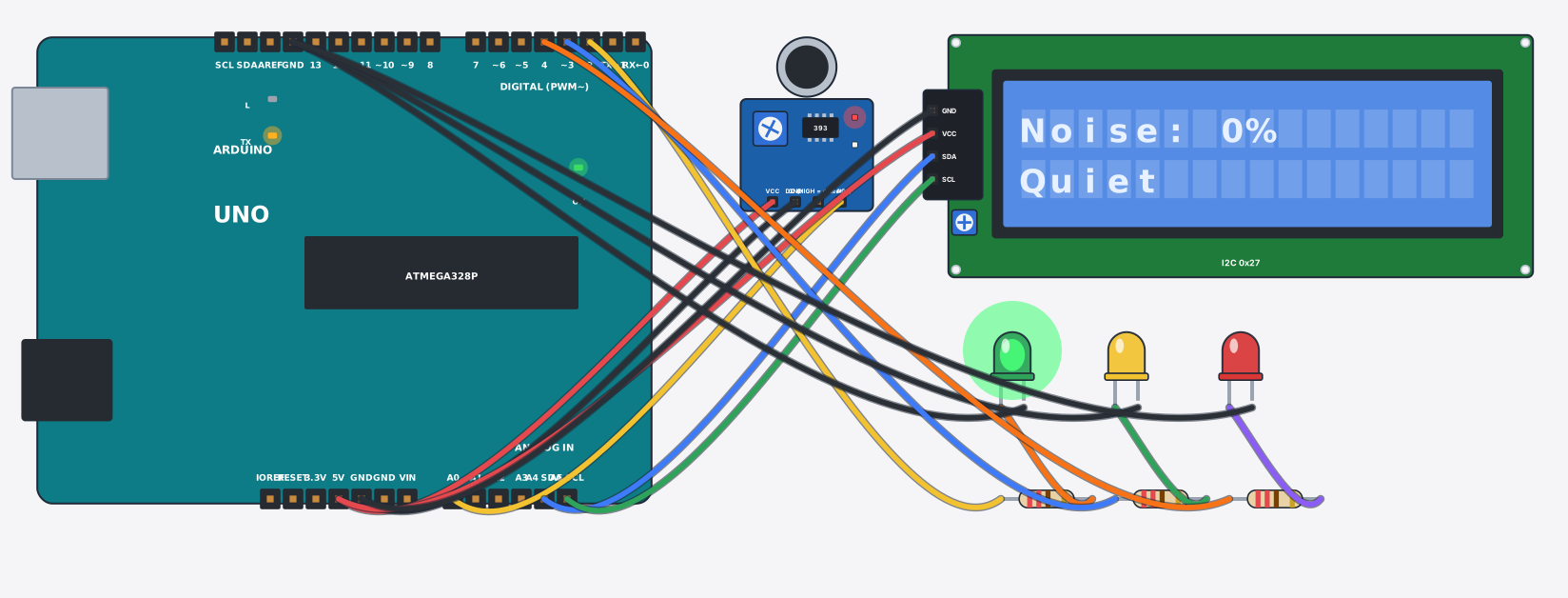
সার্কিট ডায়াগ্রাম · Circuit diagram
যা যা লাগবে · Parts you need
- 1 × Arduino Uno Arduino Uno
- 1 × Sound sensor (microphone) শব্দ সেন্সর (মাইক্রোফোন)
- 1 × LCD 16x2 with I2C LCD ১৬x২ (I2C)
- 3 × Resistor 220Ω Resistor
- 1 × LED (green) LED বাতি
- 1 × LED (yellow) LED বাতি
- 1 × LED (red) LED বাতি
- 16 × Jumper wires জাম্পার তার
তার লাগানো · Wiring
| Sound sensor (microphone) VCC | → | Arduino Uno 5V |
| Sound sensor (microphone) GND | → | Arduino Uno GND |
| Sound sensor (microphone) AO | → | Arduino Uno A0 |
| LCD 16x2 with I2C VCC | → | Arduino Uno 5V |
| LCD 16x2 with I2C GND | → | Arduino Uno GND |
| LCD 16x2 with I2C SDA | → | Arduino Uno A4 |
| LCD 16x2 with I2C SCL | → | Arduino Uno A5 |
| Arduino Uno D2 | → | Resistor a |
| Resistor b | → | LED A |
| LED K | → | Arduino Uno GND.3 |
| Arduino Uno D3 | → | Resistor a |
| Resistor b | → | LED A |
| LED K | → | Arduino Uno GND.3 |
| Arduino Uno D4 | → | Resistor a |
| Resistor b | → | LED A |
| LED K | → | Arduino Uno GND.3 |
Code (Arduino C++)
#include <Wire.h>
#include <LiquidCrystal_I2C.h>
// Classroom noise meter: the microphone's AO rises with loudness. Green = quiet,
// yellow = getting loud, red = too loud — a tiny version of the traffic-light
// boards some schools hang in class so students can see themselves getting noisy.
LiquidCrystal_I2C lcd(0x27, 16, 2);
const int mic = A0, gLed = 2, yLed = 3, rLed = 4;

void setup() {
  pinMode(gLed, OUTPUT); pinMode(yLed, OUTPUT); pinMode(rLed, OUTPUT);
  lcd.init();
  lcd.backlight();
  Serial.begin(9600);
}

void loop() {
  int pct = map(analogRead(mic), 100, 970, 0, 100);
  pct = constrain(pct, 0, 100);
  digitalWrite(gLed, pct < 40 ? HIGH : LOW);
  digitalWrite(yLed, pct >= 40 && pct < 70 ? HIGH : LOW);
  digitalWrite(rLed, pct >= 70 ? HIGH : LOW);
  lcd.setCursor(0, 0); lcd.print("Noise: "); lcd.print(pct); lcd.print("%   ");
  lcd.setCursor(0, 1);
  if (pct < 40) lcd.print("Quiet       ");
  else if (pct < 70) lcd.print("Getting loud");
  else lcd.print("TOO LOUD!   ");
  Serial.print("Noise: "); Serial.println(pct);
  delay(250);
}
আরো project · More projects
- ডট ম্যাট্রিক্সে মিউজিক ভিজ্যুয়ালাইজারMusic visualizer on a dot-matrix display
- পানি ছাড়া ট্যাংকের লেভেল (ultrasonic + অটো ফিল)Contactless water tank level (ultrasonic + auto refill)
- ঘনত্ব অনুযায়ী ট্রাফিক সিগন্যাল (কার অনুযায়ী সবুজ)Density-based traffic signal (green time follows the queue)
- GPS জিওফেন্স এলার্ম (পোষা প্রাণী বা সাইকেলের জন্য)GPS geofence alert (pet collar / bike tracker)