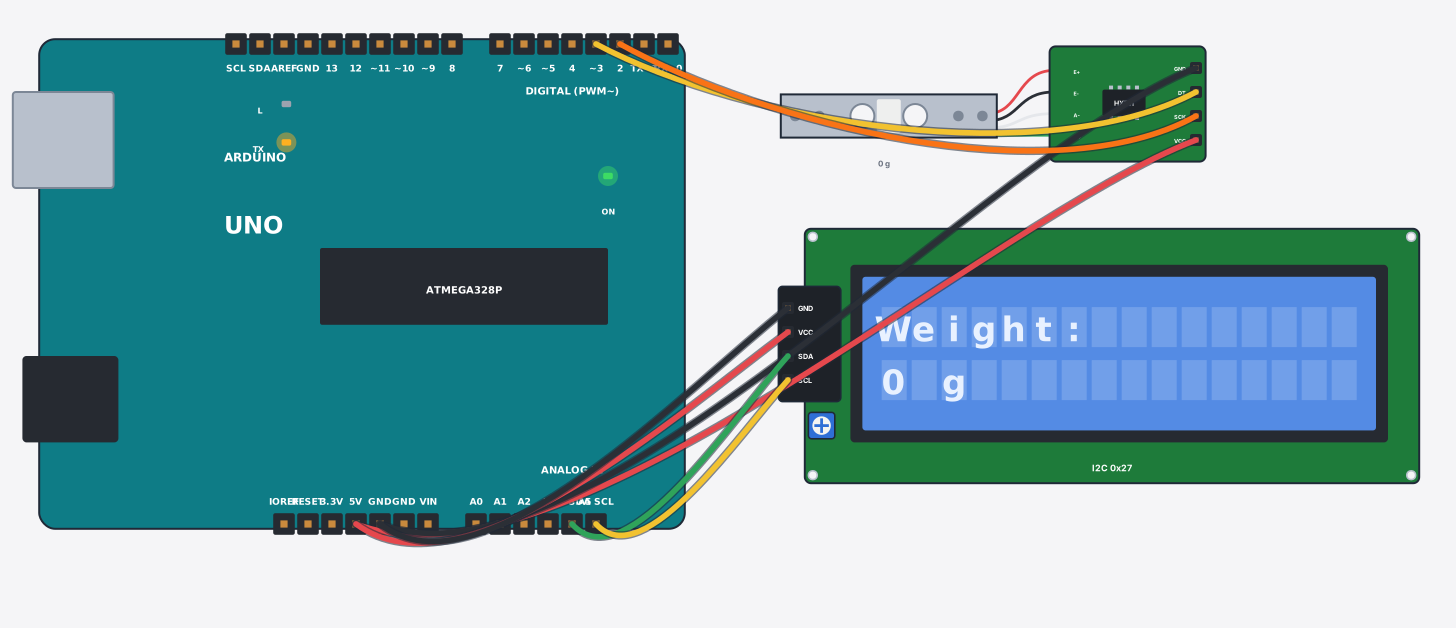
#include <Wire.h>
#include <LiquidCrystal_I2C.h>
#include <HX711.h>
// A digital scale: the load cell bar bends a tiny amount under weight and the
// HX711 amplifier turns that into numbers. Two things make it a real scale:
// tare() (zero with nothing on it) and the calibration factor (counts per gram).
// Slide the "weight" control on the HX711 to put things on the scale.
LiquidCrystal_I2C lcd(0x27, 16, 2);
HX711 scale;

void setup() {
  Serial.begin(9600);
  lcd.init();
  lcd.backlight();
  scale.begin(3, 2);        // DT -> D3, SCK -> D2
  scale.set_scale(420);     // calibration: change this for your own load cell
  scale.tare();             // zero the scale now
  Serial.println("Scale ready (tared)");
}

void loop() {
  float g = scale.get_units(3);
  lcd.setCursor(0, 0); lcd.print("Weight:         ");
  lcd.setCursor(0, 1); lcd.print(g, 0); lcd.print(" g       ");
  Serial.print("Weight: "); Serial.print(g, 1); Serial.println(" g");
  delay(400);
}