অ্যাকোয়ারিয়াম কিপার (TDS + তাপমাত্রা, অটো টপ-আপ)Aquarium Monitor with Arduino
দুটো probe পানিরে খেয়াল রাখে: TDS module ppm পড়ে (বাষ্প হয়ে যা আছে তা ঘন হয়), আর temperature probe ব্যান্ড দেখে। কোনো reading ব্যান্ডের বাইরে গেলে Arduino relay দিয়ে top-up pump চালায় — ঠান্ডা পানিতে গরম টপ-আপ, ঘন পানিতে ভাগ করে কমানো — আর reading মার্জিন পার করে সেরে না উঠলে থামে না, তাই pump বারবার ক্লিক করে না। ডেমো ব্যান্ডগুলো শেখার মান, অ্যাকোয়ারিয়ামের standard না।
Two probes watch the water: the TDS module reads ppm (evaporation concentrates what is left) and the temperature probe watches the band. When a reading leaves its band the Arduino runs the top-up pump through a relay — cold water gets warmed top-up, concentrated water gets diluted — and releases only after the reading recovers past a margin, so the pump never chatters. The demo bands are teaching values, not aquarium standards.
সার্কিট ডায়াগ্রাম · Circuit diagram
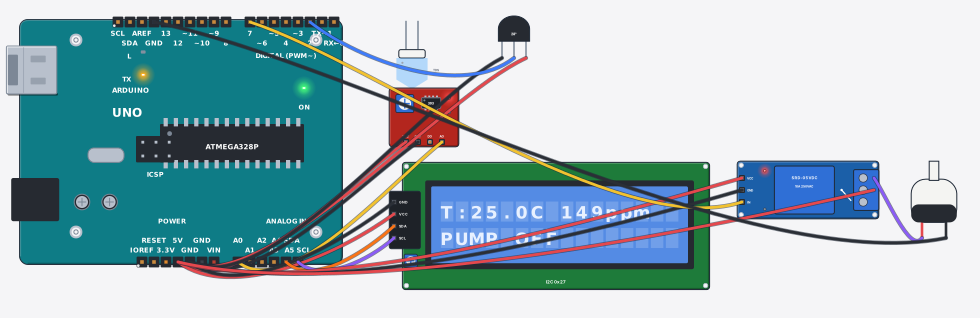
যা যা লাগবে · Parts you need
- 1 × Arduino Uno R3 Arduino Uno
- 1 × TDS water quality sensor TDS পানির মানের সেন্সর
- 1 × DS18B20 temperature sensor DS18B20 তাপমাত্রা সেন্সর
- 1 × LCD 16x2 with I2C LCD ১৬x২ (I2C)
- 1 × Relay module (5V, 1 channel) রিলে মডিউল (5V, ১ চ্যানেল)
- 1 × Mini water pump (3–6V) ছোট পানির পাম্প (৩–৬V)
- 16 × Jumper wires জাম্পার তার
তার লাগানো · Wiring
| TDS water quality sensor VCC | → | Arduino Uno R3 5V |
| TDS water quality sensor GND | → | Arduino Uno R3 GND |
| TDS water quality sensor AO | → | Arduino Uno R3 A0 |
| DS18B20 temperature sensor VDD | → | Arduino Uno R3 5V |
| DS18B20 temperature sensor GND | → | Arduino Uno R3 GND |
| DS18B20 temperature sensor DQ | → | Arduino Uno R3 D2 |
| LCD 16x2 with I2C VCC | → | Arduino Uno R3 5V |
| LCD 16x2 with I2C GND | → | Arduino Uno R3 GND |
| LCD 16x2 with I2C SDA | → | Arduino Uno R3 A4 |
| LCD 16x2 with I2C SCL | → | Arduino Uno R3 A5 |
| Relay module (5V, 1 channel) VCC | → | Arduino Uno R3 5V |
| Relay module (5V, 1 channel) GND | → | Arduino Uno R3 GND |
| Relay module (5V, 1 channel) IN | → | Arduino Uno R3 D7 |
| Relay module (5V, 1 channel) COM | → | Arduino Uno R3 5V |
| Relay module (5V, 1 channel) NO | → | Mini water pump (3–6V) + |
| Mini water pump (3–6V) - | → | Arduino Uno R3 GND.3 |
Code (Arduino C++)
#include <Wire.h>
#include <LiquidCrystal_I2C.h>
#include <OneWire.h>
#include <DallasTemperature.h>
LiquidCrystal_I2C lcd(0x27, 16, 2);
// Aquarium keeper: two probes watch the tank - a TDS probe (ppm) and a
// temperature probe - and the pump tops the tank up through the relay while a
// reading is out of its band. Cold water gets warmed top-up from the
// reservoir; a high ppm (evaporation concentrates what is left) gets diluted
// back down. A hot tank only warns: this build has no chiller, and honesty
// about what the pump cannot fix is part of the lesson.
// Each band has two thresholds (start, then release only after the reading
// recovers past a margin) so the pump never chatters on a borderline value.
// The Serial monitor is the manual override: send m to toggle the pump,
// 1/0 to force it on/off, a to go back to automatic.
// The demo bands are teaching values, not aquarium standards. The probe is a
// DS18B20 one-wire temperature sensor read through the DallasTemperature
// library - exactly the pattern the real build uses.
const int TDS_PIN = A0, ONE_WIRE_PIN = 2, PUMP_PIN = 7;
const float TEMP_MIN = 22.0, TEMP_MAX = 28.0;   // tropical tank demo band
const float PPM_MAX = 450.0;                    // dilute above this
const float TEMP_BACK = 1.0, PPM_BACK = 50.0;   // release margins (hysteresis)

bool pumping = false, manual = false;

float readPpm() {
  long sum = 0;
  for (int i = 0; i < 8; i++) { sum += analogRead(TDS_PIN); delay(2); }
  float v = (sum / 8.0) * (5.0 / 1023.0);
  float ppm = (v - 0.25) / 4.5 * 1000.0;         // AO: 0.05x supply at 0 ppm .. 0.95x at 1000
  if (ppm < 0) ppm = 0;
  return ppm;
}

OneWire oneWire(ONE_WIRE_PIN);          // DS18B20 data line (D2)
DallasTemperature tempSensor(&oneWire);

void setup() {
  Serial.begin(9600);
  pinMode(PUMP_PIN, OUTPUT);
  pinMode(13, OUTPUT);
  tempSensor.begin();
  lcd.init();
  lcd.backlight();
  Serial.println("Aquarium keeper: bands 22-28 C, 0-450 ppm");
}

void loop() {
  float ppm = readPpm();
  tempSensor.requestTemperatures();
  float tC = tempSensor.getTempCByIndex(0);

  while (Serial.available()) {                   // manual override from the monitor
    char c = Serial.read();
    if (c == 'm') manual = !manual;
    else if (c == '1') { manual = true; pumping = true; }
    else if (c == '0') { manual = true; pumping = false; }
    else if (c == 'a') manual = false;           // back to automatic
  }

  bool cold = tC < TEMP_MIN;
  bool hot = tC > TEMP_MAX;
  bool strong = ppm > PPM_MAX;
  if (!manual) {
    if (!pumping && (cold || strong)) pumping = true;
    if (pumping && tC >= TEMP_MIN + TEMP_BACK && ppm <= PPM_MAX - PPM_BACK) pumping = false;
  }
  digitalWrite(PUMP_PIN, pumping ? HIGH : LOW);
  digitalWrite(13, pumping ? HIGH : LOW);

  lcd.setCursor(0, 0);
  lcd.print("T:"); lcd.print(tC, 1); lcd.print("C ");
  lcd.print((int)ppm); lcd.print("ppm     ");
  lcd.setCursor(0, 1);
  lcd.print(pumping ? "PUMP ON" : "PUMP OFF");
  if (manual) lcd.print(" (man)");
  else if (cold) lcd.print(" cold ");
  else if (strong) lcd.print(" ppm! ");
  else if (hot) lcd.print(" HOT! ");
  else lcd.print("      ");
  Serial.print("T:"); Serial.print(tC, 1);
  Serial.print("C ppm:"); Serial.print(ppm, 0);
  Serial.print(" | Pump: "); Serial.println(pumping ? "ON" : "OFF");
  delay(300);
}
আরো project · More projects
- সোলার ট্র্যাকার: প্যানেল রোদের দিকে ঘোরেSolar tracker: the panel follows the sun
- দুমুখো ভিজিটর কাউন্টার (LCD তে ঢোকা-বের হওয়া)Bidirectional visitor counter (in/out on LCD)
- ক্ল্যাপ সুইচ: হাততালি দিলেই বাতি অন-অফClap switch: one clap toggles the lamp
- MOSFET দিয়ে DC মোটরের গতি নিয়ন্ত্রণ (PWM)DC motor speed control with a MOSFET (PWM)