ESP32 MQTT সেন্সর নোড (তাপমাত্রা publish করে)ESP32 MQTT: Publish Sensor Data (DHT22)
ESP32 Wi-Fi তে জুড়ে MQTT broker এ যায়, প্রতি ৩ সেকেন্ডে tekko/weather topic এ তাপমাত্রা আর আর্দ্রতা publish করে। ওই topic এ subscribe করা যেকোনো dashboard ডেটা পায় — subscribe করা MQTT light প্রজেক্টের সাথে জোড়া লাগে।
The ESP32 joins Wi-Fi, connects to an MQTT broker and publishes {"temp":..,"hum":..} to tekko/weather every 3 seconds. Any dashboard subscribed to the topic receives it — pair it with the MQTT light project, which subscribes.
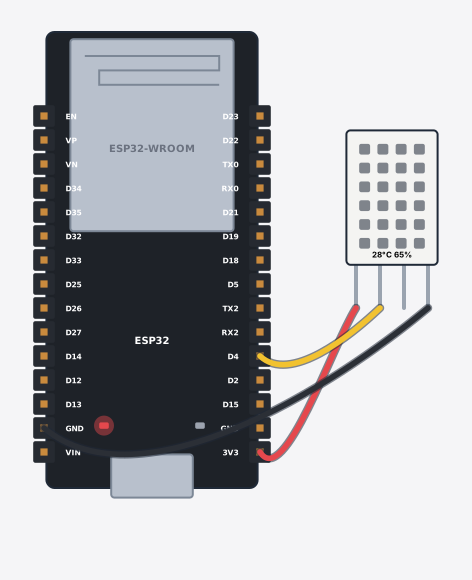
সার্কিট ডায়াগ্রাম · Circuit diagram
যা যা লাগবে · Parts you need
- 1 × ESP32 DevKit V1 ESP32 DevKit V1
- 1 × DHT22 temperature & humidity DHT22 তাপমাত্রা ও আর্দ্রতা সেন্সর
- 3 × Jumper wires জাম্পার তার
তার লাগানো · Wiring
| DHT22 temperature & humidity VCC | → | ESP32 DevKit V1 3V3 |
| DHT22 temperature & humidity GND | → | ESP32 DevKit V1 GND |
| DHT22 temperature & humidity DATA | → | ESP32 DevKit V1 D4 |
Code (Arduino C++)
#include <WiFi.h>
#include <PubSubClient.h>
#include <DHT.h>
// An MQTT sensor node — the other half of the MQTT light project. The ESP32 reads
// the DHT22 every 3 s and publishes it to a topic. Any dashboard subscribed to
// tekko/weather (phone, Home Assistant, another ESP32) receives the updates.
// Open the IoT -> MQTT panel to watch the messages arrive.
DHT dht(4, DHT22);
WiFiClient net;
PubSubClient mqtt(net);
long nextTry = 0, nextPub = 0;
bool saidWifi = false;

void setup() {
  Serial.begin(115200);
  dht.begin();
  WiFi.begin("Tekko-WiFi", "12345678");
  mqtt.setServer("broker.hivemq.com", 1883);
}

void loop() {
  if (WiFi.status() != WL_CONNECTED) { delay(200); return; }
  if (!saidWifi) { saidWifi = true; Serial.println("WiFi connected"); }
  mqtt.loop();
  if (!mqtt.connected()) {              // retry, never block the loop on the broker
    if (millis() > nextTry) { nextTry = millis() + 800; mqtt.connect("tekko-sensor"); }
    return;
  }
  if (millis() > nextPub) {
    nextPub = millis() + 3000;
    float t = dht.readTemperature();
    float h = dht.readHumidity();
    String payload = "{\"temp\":" + String(t) + ",\"hum\":" + String(h) + "}";
    mqtt.publish("tekko/weather", payload.c_str());
    Serial.print("Published "); Serial.print(payload); Serial.print(" to tekko/weather ("); Serial.print(t); Serial.println(" C)");
  }
}
আরো project · More projects
- দুই জয়স্টিকে চলা ৪-DOF রোবোটিক আর্ম4-DOF robotic arm controlled by two joysticks
- ওজন মাপার স্কেল: লোড সেল + HX711 (tare ও গ্রাম)Weight scale: load cell + HX711 (tare and grams)
- MPU6050 টিল্ট কন্ট্রোলার (৪টা LED দিক দেখায়)MPU6050 tilt controller (4 LEDs show the direction)
- এনার্জি মনিটর: LCD তে V, I ও power (ACS712)Energy monitor: real V, I and power on an LCD (ACS712)