ফায়ার অ্যালার্ম (আগুন সেন্সর)Fire Alarm System using Arduino & Flame Sensor
আগুন থেকে বের হওয়া infrared আলো flame sensor দেখতে পায়। আগুন থাকলে DO pin HIGH হয়, আর Arduino buzzer বাজায় ও লাল LED জ্বালায়-নেভায়, যতক্ষণ আগুন থাকে। AO বলে আগুন কত জোরালো।
The flame sensor sees the infrared light a fire gives off. Its DO pin goes HIGH when there is a flame, and the Arduino beeps the buzzer and flashes the red LED until the fire is gone. AO tells how strong the flame is.
সার্কিট ডায়াগ্রাম · Circuit diagram
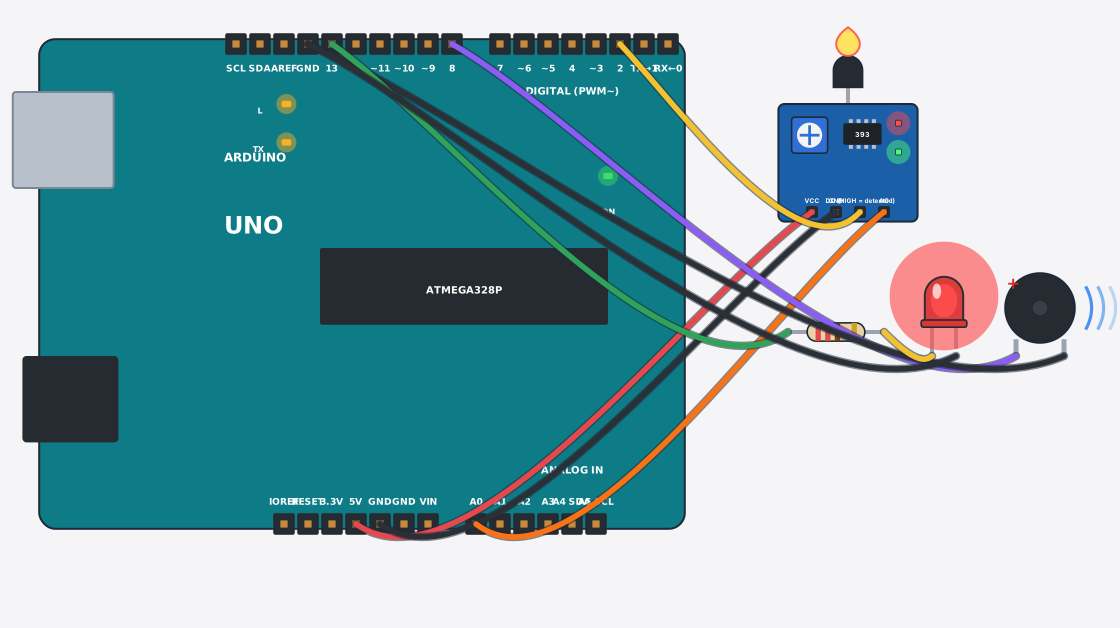
যা যা লাগবে · Parts you need
- 1 × Arduino Uno Arduino Uno
- 1 × Flame sensor আগুন সেন্সর (Flame)
- 1 × Buzzer Buzzer (বাঁশি)
- 1 × Resistor 220Ω Resistor
- 1 × LED (red) LED বাতি
- 9 × Jumper wires জাম্পার তার
তার লাগানো · Wiring
| Flame sensor VCC | → | Arduino Uno 5V |
| Flame sensor GND | → | Arduino Uno GND |
| Flame sensor DO | → | Arduino Uno D2 |
| Flame sensor AO | → | Arduino Uno A0 |
| Arduino Uno D8 | → | Buzzer + |
| Buzzer - | → | Arduino Uno GND.3 |
| Arduino Uno D13 | → | Resistor a |
| Resistor b | → | LED A |
| LED K | → | Arduino Uno GND.3 |
Code (Arduino C++)
// Fire alarm: the flame sensor's DO pin goes HIGH when it sees fire.
// The alarm beeps on and off and the red light flashes until the fire is gone.
const int flamePin = 2, buzzer = 8, led = 13;

void setup() {
  pinMode(flamePin, INPUT);
  pinMode(buzzer, OUTPUT);
  pinMode(led, OUTPUT);
  Serial.begin(9600);
}

void loop() {
  if (digitalRead(flamePin) == HIGH) {
    Serial.print("FIRE! strength = "); Serial.println(analogRead(A0));
    digitalWrite(buzzer, HIGH); digitalWrite(led, HIGH);
    delay(200);
    digitalWrite(buzzer, LOW);  digitalWrite(led, LOW);
    delay(200);
  } else {
    digitalWrite(buzzer, LOW);
    digitalWrite(led, LOW);
    delay(200);
  }
}