ডিজিটাল থার্মোমিটার: LM35 + LCDLM35 Temperature Sensor Arduino
LM35 প্রতি °C এ 10 mV দেয়, তাই 25 °C মানে 0.25 V। analogRead voltage কে 0–1023 বানায়; 5.0 / 1023 দিয়ে গুণ করলে volt, তারপর 100 দিয়ে গুণ করলে °C। Temperature slider নাড়ালে LCD ও বদলায়।
The LM35 gives 10 mV for every °C, so 25 °C is 0.25 V. analogRead turns the voltage into 0–1023; multiply by 5.0 / 1023 to get volts and by 100 to get °C. Move the temperature slider and the LCD follows.
সার্কিট ডায়াগ্রাম · Circuit diagram
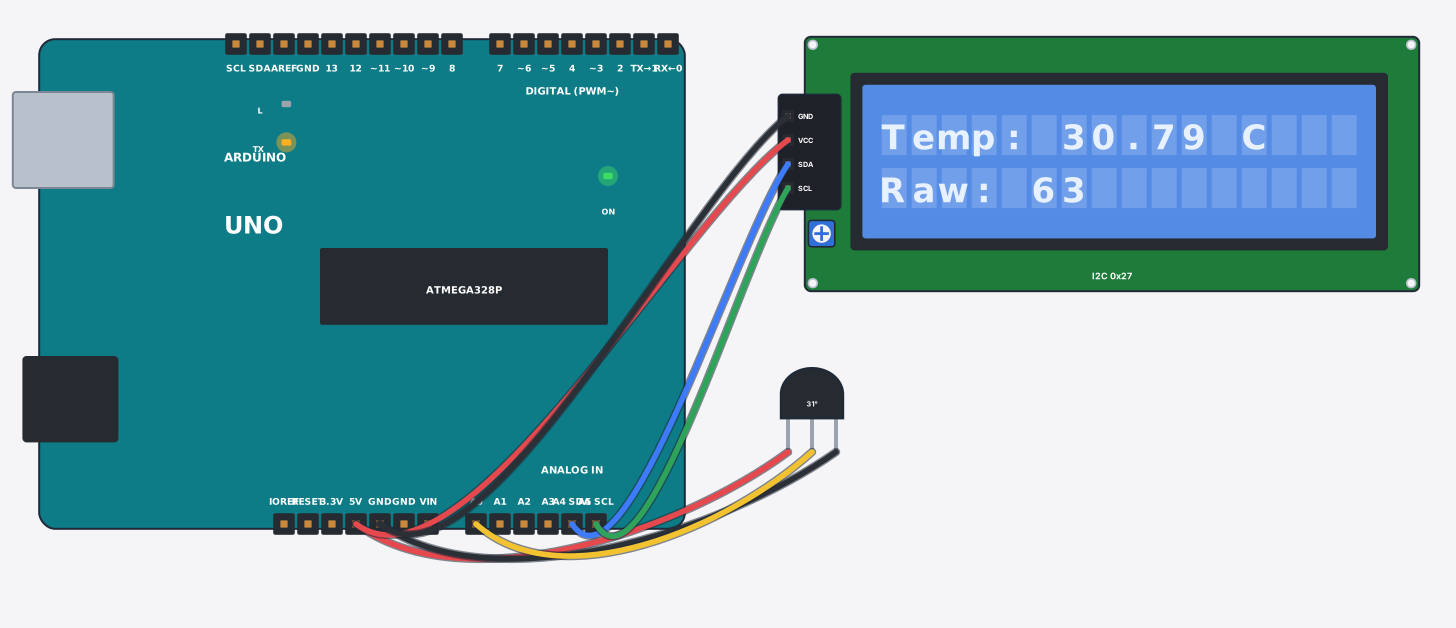
যা যা লাগবে · Parts you need
- 1 × Arduino Uno Arduino Uno
- 1 × LM35 temperature sensor LM35 তাপমাত্রা সেন্সর
- 1 × LCD 16x2 with I2C LCD ১৬x২ (I2C)
- 7 × Jumper wires জাম্পার তার
তার লাগানো · Wiring
| LM35 temperature sensor +Vs | → | Arduino Uno 5V |
| LM35 temperature sensor GND | → | Arduino Uno GND |
| LM35 temperature sensor Vout | → | Arduino Uno A0 |
| LCD 16x2 with I2C VCC | → | Arduino Uno 5V |
| LCD 16x2 with I2C GND | → | Arduino Uno GND |
| LCD 16x2 with I2C SDA | → | Arduino Uno A4 |
| LCD 16x2 with I2C SCL | → | Arduino Uno A5 |
Code (Arduino C++)
#include <Wire.h>
#include <LiquidCrystal_I2C.h>
LiquidCrystal_I2C lcd(0x27, 16, 2);
const int sensorPin = A0;

void setup() {
  lcd.init();
  lcd.backlight();
  Serial.begin(9600);
}

void loop() {
  int raw = analogRead(sensorPin);       // 0-1023 means 0-5 V
  float volts = raw * 5.0 / 1023.0;
  float tempC = volts * 100.0;           // LM35 gives 10 mV for every degree C
  lcd.setCursor(0, 0);
  lcd.print("Temp: ");
  lcd.print(tempC);
  lcd.print(" C  ");
  lcd.setCursor(0, 1);
  lcd.print("Raw: ");
  lcd.print(raw);
  lcd.print("    ");
  Serial.print("Temperature: "); Serial.print(tempC); Serial.println(" C");
  delay(1000);
}