পানির লেভেল নির্দেশকWater Level Indicator using Arduino
Sensor যত বেশি পানিতে ডোবে, A0 এর মান তত বাড়ে। ১০০ পার হলে সবুজ LED, ৩০০ পার হলে হলুদ, ৫৫০ পার হলে লাল LED আর buzzer — ট্যাংক ভরা। Simulator এ water level slider টেনে ট্যাংক ভরো।
The deeper the sensor sits in water, the higher the reading on A0. Above 100 the green LED lights, above 300 the yellow, above 550 the red LED and the buzzer — the tank is full. Slide the water level in the simulator to fill the tank.
সার্কিট ডায়াগ্রাম · Circuit diagram
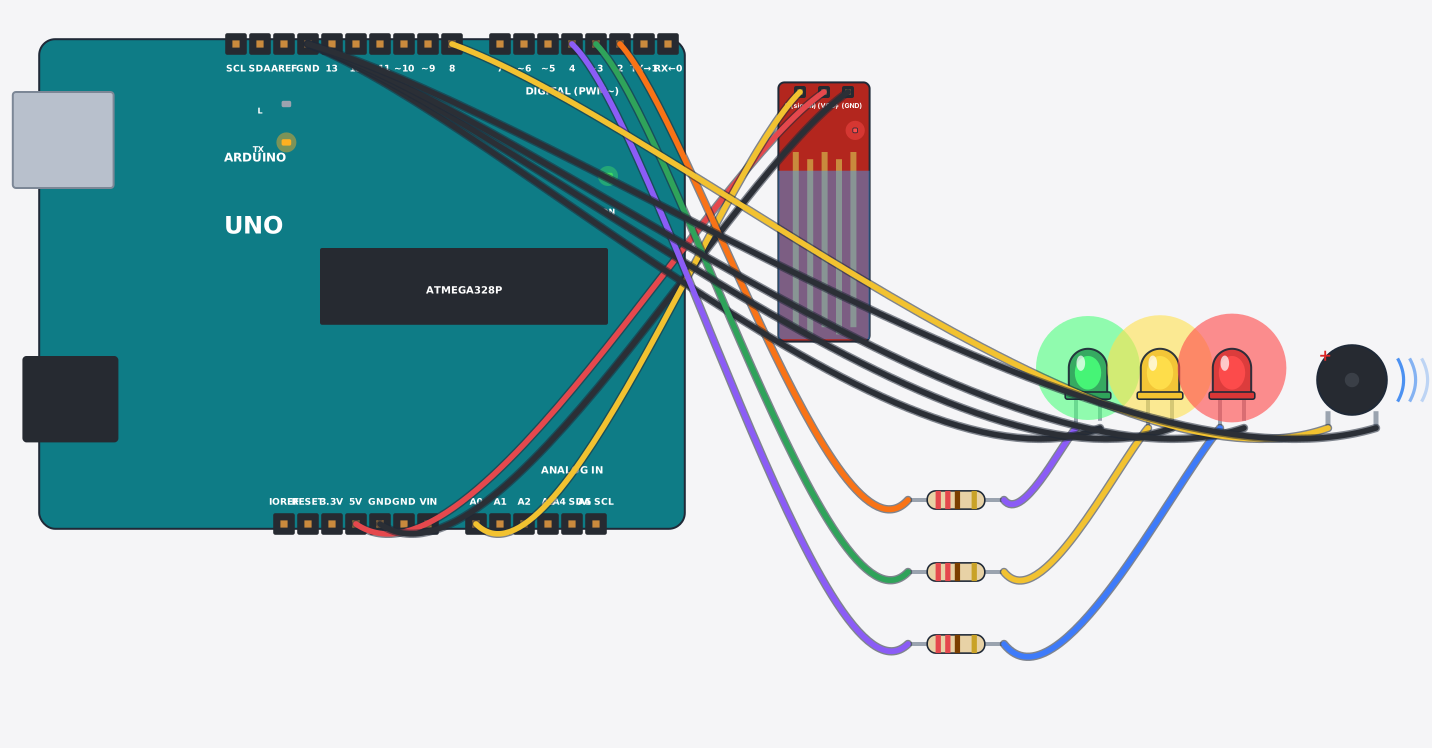
যা যা লাগবে · Parts you need
- 1 × Arduino Uno Arduino Uno
- 1 × Water level sensor পানির লেভেল সেন্সর
- 3 × Resistor 220Ω Resistor
- 1 × LED (green) LED বাতি
- 1 × LED (yellow) LED বাতি
- 1 × LED (red) LED বাতি
- 1 × Buzzer Buzzer (বাঁশি)
- 14 × Jumper wires জাম্পার তার
তার লাগানো · Wiring
| Water level sensor + | → | Arduino Uno 5V |
| Water level sensor - | → | Arduino Uno GND |
| Water level sensor S | → | Arduino Uno A0 |
| Arduino Uno D2 | → | Resistor a |
| Resistor b | → | LED A |
| LED K | → | Arduino Uno GND.3 |
| Arduino Uno D3 | → | Resistor a |
| Resistor b | → | LED A |
| LED K | → | Arduino Uno GND.3 |
| Arduino Uno D4 | → | Resistor a |
| Resistor b | → | LED A |
| LED K | → | Arduino Uno GND.3 |
| Arduino Uno D8 | → | Buzzer + |
| Buzzer - | → | Arduino Uno GND.3 |
Code (Arduino C++)
// Water level indicator: the deeper the sensor sits in water, the higher A0 reads.
// Green = some water, yellow = half, red + buzzer = tank full.
const int sensorPin = A0;
const int lowLed = 2, midLed = 3, highLed = 4, buzzer = 8;

void setup() {
  pinMode(lowLed, OUTPUT);
  pinMode(midLed, OUTPUT);
  pinMode(highLed, OUTPUT);
  pinMode(buzzer, OUTPUT);
  Serial.begin(9600);
}

void loop() {
  int level = analogRead(sensorPin);
  Serial.print("Water reading: "); Serial.println(level);
  digitalWrite(lowLed,  level > 100 ? HIGH : LOW);
  digitalWrite(midLed,  level > 300 ? HIGH : LOW);
  digitalWrite(highLed, level > 550 ? HIGH : LOW);
  digitalWrite(buzzer,  level > 550 ? HIGH : LOW);
  delay(300);
}