শক অ্যালার্মSW-420 Vibration Sensor Arduino
SW-420 এর ভেতরের স্প্রিং কাঁপলেই LM393 বোর্ড DO LOW করে দেয়। এক ধাক্কাতেই অ্যালার্ম ল্যাচ হয়ে বাজতে থাকে — একবার ধাক্কা দিয়ে চুপ বসে থাকলে লাভ হয় না — আর কাঁপুনি থামার পর রিসেট বাটন চাপলে তবেই থামে।
The SW-420's spring only closes while something is actually shaking, and its LM393 board pulls DO LOW for exactly that time. One jolt latches the alarm — a knock-and-wait intruder gains nothing — and the reset button, pressed while the box is still again, is the only thing that silences it.
সার্কিট ডায়াগ্রাম · Circuit diagram
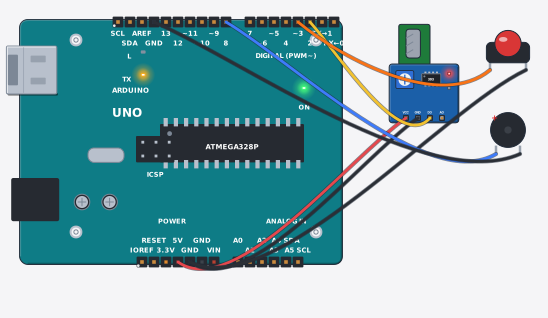
যা যা লাগবে · Parts you need
- 1 × Arduino Uno R3 Arduino Uno
- 1 × Vibration sensor (SW-420) ভাইব্রেশন সেন্সর (SW-420)
- 1 × Push button চাপ-বাটন
- 1 × Buzzer (5 V) Buzzer (বাঁশি, 5 V)
- 7 × Jumper wires জাম্পার তার
তার লাগানো · Wiring
| Vibration sensor (SW-420) VCC | → | Arduino Uno R3 5V |
| Vibration sensor (SW-420) GND | → | Arduino Uno R3 GND |
| Vibration sensor (SW-420) DO | → | Arduino Uno R3 D2 |
| Push button 1 | → | Arduino Uno R3 D3 |
| Push button 2 | → | Arduino Uno R3 GND |
| Buzzer (5 V) + | → | Arduino Uno R3 D8 |
| Buzzer (5 V) - | → | Arduino Uno R3 GND.3 |
Code (Arduino C++)
// SW-420 shock alarm: the little spring inside the SW-420 only closes while
// something is actually shaking, so its LM393 board holds DO HIGH at rest and
// pulls it LOW for every jolt. One jolt latches the siren - a knock-and-wait
// thief gains nothing - and only the reset button, pressed while the box is
// still again, silences it. The same pattern guards shop shutters and safes.
const int shockPin = 2, resetPin = 3, siren = 8;

void setup() {
  Serial.begin(9600);
  pinMode(shockPin, INPUT_PULLUP);   // DO idles HIGH; LOW while the spring moves
  pinMode(resetPin, INPUT_PULLUP);   // button to GND: pressed reads LOW
  pinMode(siren, OUTPUT);
}

void loop() {
  bool shaking = digitalRead(shockPin) == LOW;
  bool ack = digitalRead(resetPin) == LOW;
  static bool alarm = false;
  if (shaking) alarm = true;             // the latch: one knock, screaming on
  if (ack && !shaking) alarm = false;    // the button only works once it is calm
  digitalWrite(siren, alarm ? HIGH : LOW);
  Serial.print("Shake: "); Serial.print(shaking ? 1 : 0);
  Serial.print(" | Alarm: "); Serial.println(alarm ? 1 : 0);
  delay(150);
}